Short answer: A 403 error after you submit a WordPress form means something in front of WordPress refused the request: a security plugin, a firewall (WAF), Cloudflare or your hosting company. For Easy Form Builder, allow requests to /wp-json/Emsfb/, keep the X-WP-Nonce header, and exclude the form page from page caching.
Quick facts
- Applies to: every plan (Free, Free Plus and Pro)
- Time: about 10 minutes
- Tested with: Easy Form Builder 4.3.1 on WordPress 7.1.4, with a proxy that removed the X-WP-Nonce header
- Last verified:

Video transcript
Getting a 403 error when you submit a WordPress form? It means a security plugin, a firewall, or your host refused the form request before it reached WordPress. Logged in as an administrator, click Why did this fail. Easy Form Builder’s Error Monitor explains the cause, and where to look. The fix: allow the Emsfb REST path in your security plugin or firewall, keep the X-WP-Nonce header, and exclude the form page from page caching. The full guide matches each error message to its fix. Easy Form Builder is free on WordPress.org. The full guide is on whitestudio.team.
What a 403 error after Submit means
HTTP 403 Forbidden means the server understood the request but refused it. When a visitor clicks Submit, Easy Form Builder sends the answers to your site’s REST API at /wp-json/Emsfb/v1/forms/message/add. If a firewall or security rule stops that request, the form cannot save the entry or send the email.
A typical sign: the form works while you are logged in as an administrator but fails for visitors, because many security plugins treat logged-out REST API requests more strictly.
Match the message to the cause
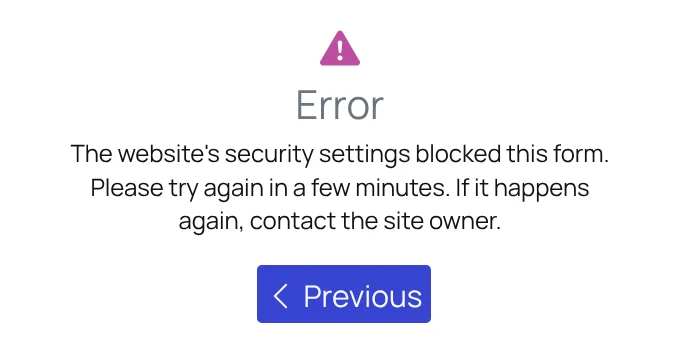
In version 4.3.1, Easy Form Builder shows visitors a plain message for each kind of failure. Use it to find the right fix:
| What the visitor sees | What happened | Fix |
|---|---|---|
| “The website’s security settings blocked this form. Please try again in a few minutes. If it happens again, contact the site owner.” | A security plugin, firewall, CDN or host refused the request (HTTP 403), or removed the X-WP-Nonce header. | Fix 1 and Fix 2 |
| “Your session has expired. Please refresh the page and try again.” | The page was served with an old security token, usually from a page cache. | Fix 3 |
| “This website is not accepting forms from visitors right now. Please contact the site owner.” | The REST API is closed to logged-out visitors. | Fix 1 |
| “Please log in to use this form.” | The form is set as a private form. This is intended, not an error. | Private forms |
| “Too many requests. Please try again shortly.” | A rate limit stopped repeated submissions. | Wait, or raise the limit in your firewall |
See the exact cause in the Error Monitor
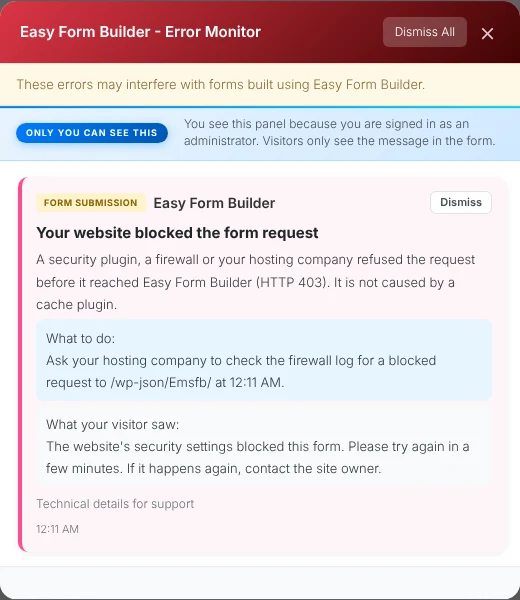
When you are logged in as an administrator and a submission fails, the form also shows Why did this fail?. It opens the Easy Form Builder Error Monitor, which only administrators can see. For a 403 it says “Your website blocked the form request” and tells you where to look:
- If a firewall plugin is active (for example Wordfence, Solid Security, All-In-One Security, Shield Security, Sucuri Security, BBQ Firewall, WP Cerber or BulletProof Security), it names that plugin and the time of the blocked request.
- If Cloudflare answered with a security check, it says so and points you to Cloudflare under Security, Events.
- Otherwise it asks you to have your hosting company check the firewall log for a blocked request to
/wp-json/Emsfb/at that time.
Check the failed request in your browser
- Open the page with the form and open your browser’s developer tools: F12 or Ctrl+Shift+I on Windows and Linux, Cmd+Option+I on macOS (in Safari, first turn on Show features for web developers under Settings, Advanced).
- Open the Network tab and click its clear button.
- Submit the form and click the request named
addwith status 403. - Read the response.
efb_nonce_missing(“X-WP-Nonce header is missing”) means something on the way removed the header.efb_nonce_expiredmeans the token was out of date. An HTML page from your firewall or Cloudflare means the request never reached WordPress.
Note: Easy Form Builder 4.3.1 recovers from an expired token by itself: it fetches a fresh one from /wp-json/Emsfb/v1/nonce/refresh and sends the form again once. If the second try is refused too, the header is being removed on the way, and the visitor sees the “blocked” message.
Fix 1 — Allow Easy Form Builder in your security plugin
- Add
/wp-json/Emsfb/to the allowed or allowlisted URLs of your security plugin. Write it exactly like this, with a capital E. - Make sure no rule removes or blocks the
X-WP-Noncerequest header. - If the plugin has an option such as “Disable REST API for non-logged-in users”, turn it off or add the
Emsfbnamespace as an exception. Public forms are sent by logged-out visitors. - Check the plugin’s firewall or live-traffic log for blocked requests to
/wp-json/Emsfb/; most plugins let you allowlist a blocked request from the log.
Settings for Wordfence, Solid Security, All-In-One Security, Sucuri, Shield Security and WP Cerber are in security plugin compatibility with Easy Form Builder.
Fix 2 — Cloudflare, Sucuri and hosting firewalls (WAF)
A cloud firewall can block the request before it reaches WordPress, so nothing appears in your WordPress logs. In Cloudflare, open Security, Events, find the blocked or challenged request to /wp-json/Emsfb/, and create a rule that skips the managed rules for that path (see Cloudflare’s skip rules). With Sucuri or a hosting firewall such as ModSecurity, ask support to allowlist the same path and keep the X-WP-Nonce header.
Fix 3 — Exclude the form page from page caching
A full-page cache can serve the form with an old security token. Exclude every page that contains a form (for example /contact/ or /order-form/) from page caching, turn off JavaScript delay or combine for those pages, then clear the plugin, server and CDN caches and test in a private window.
Easy Form Builder works with WP Rocket, LiteSpeed Cache, W3 Total Cache, WP Super Cache, WP Fastest Cache, WP-Optimize, Autoptimize, Hummingbird and Jetpack once the form pages are excluded. Exact settings per plugin: exclude Easy Form Builder forms from caching plugins.
Fix 4 — Update Easy Form Builder
Use version 4.3.1 or later (this guide was tested on 4.3.1). It retries once with a fresh token, tells visitors what happened in plain words, and shows administrators the Error Monitor. If you still see the short message “Your security session has expired or is invalid. Please refresh the page. E403”, refresh the page and follow Fix 3.
Quick checklist
- The failed request goes to
/wp-json/Emsfb/and returns 403. /wp-json/Emsfb/is allowlisted in the security plugin and the WAF.- The
X-WP-Nonceheader reaches the server. - The REST API is open to logged-out visitors.
- Form pages are excluded from page caching and all caches are cleared.
- The form works in a private window as a visitor.
Is the 403 a bug in Easy Form Builder?
Usually not. In our test, Easy Form Builder answered normally until a proxy removed the X-WP-Nonce header; only then did the server return 403 with efb_nonce_missing. The plugin can only process a form after the request reaches WordPress with its headers intact. Do not leave your security or cache plugin switched off; allow the form requests instead.
Frequently asked questions
What does “403 Forbidden” mean when submitting a form?
The server received the form but refused to process it. On WordPress this is almost always a security plugin, a firewall or a CDN rule, not the form itself.
Why does my form work when I am logged in but not for visitors?
Many security plugins allow REST API requests from logged-in users and block or limit them for visitors. Allow /wp-json/Emsfb/ for logged-out visitors.
Do I have to turn off my security plugin?
No. Turn it off only for a quick test. The fix is an allowlist entry for /wp-json/Emsfb/ and keeping the X-WP-Nonce header.
What is the X-WP-Nonce header?
A short-lived security token WordPress uses to confirm that a REST API request comes from your own site. Easy Form Builder sends it with every submission. See the WordPress REST API authentication docs.
What’s next
- Security plugin settings for Easy Form Builder
- Exclude form pages from caching plugins
- Stop form spam without CAPTCHA
- Create a multi-step form in WordPress
Updated for Easy Form Builder 4.3.1 on . Rewritten with the real error codes and messages of 4.3.1, re-tested with the X-WP-Nonce header removed, and merged with our older 403 guide.