A Beginner-Friendly, Step-by-Step Guide Using functions.php
Introduction
Easy Form Builder is a flexible WordPress form plugin that follows WordPress coding standards and provides useful hooks and filters for customization. One common customization request from users is controlling or disabling:
- The Easy Form Builder author link
- The generator meta tag output
What This Article Covers
In this tutorial, you will learn:
- What the Easy Form Builder author link filter does
- What the generator meta tag filter controls
- How the provided PHP code works (line by line)
- How to add the code to
functions.phpfrom the WordPress dashboard - Where to place the code correctly
- How to verify that everything works
This guide is suitable for:
- WordPress beginners
- Site owners
- Non-developers
- Anyone using Easy Form Builder
The Code We Are Explaining
The customization uses two filters provided by Easy Form Builder.
Disable the Author Link
/**
 * Disable Easy Form Builder author link tag
 * Add to functions.php or custom plugin
 */
add_filter( 'efb_author_link_enabled', '__return_false' );
Control the Generator Meta Tag
/**
 * Filter WordPress generator meta tag
 *
 * @param string $generator The generator output
 * @param string $type The type of generator (xhtml, html, etc)
 * @return string Modified generator output
 */
public function efb_filter_generator( $generator, $type ) {
    $enabled = apply_filters( 'efb_generator_meta_enabled', true );

    if ( ! $enabled ) {
        return $generator;
    }

    if ( $type === 'xhtml' ) {
        return '<meta name="generator" content="' .
            esc_html__( 'Easy Form Builder', 'easy-form-builder' ) .
            ' - ' .
            esc_html__( 'WhiteStudio.team', 'easy-form-builder' ) .
            '" />' . "\n";
    }

    return $generator;
}
Understanding the Easy Form Builder Author Link Filter
What Is the Author Link?
Some WordPress plugins optionally output an author or credit link as part of their rendering process. Easy Form Builder allows this behavior to be controlled using a filter.
How the Filter Works
add_filter( 'efb_author_link_enabled', '__return_false' );
This line tells WordPress:
- Use the filter
efb_author_link_enabled - Always return
false
__return_false is a built-in WordPress helper function that simply returns false.
Result
When Easy Form Builder checks whether the author link should be printed, it receives false, and the link is not output.
No plugin files are edited, and updates will not overwrite this change.
Understanding the Generator Meta Tag Code
What Is a Generator Meta Tag?
A generator meta tag is usually printed inside the <head> section of a page and identifies the software responsible for generating the content.
Easy Form Builder provides a filterable and extensible way to manage this output.
Breaking Down the Generator Filter Function
Function Signature
public function efb_filter_generator( $generator, $type )
Parameters:
$generator: the current generator output$type: output format (HTML or XHTML)
Enable/Disable Logic
$enabled = apply_filters( 'efb_generator_meta_enabled', true );
This allows developers or site owners to decide whether the generator meta tag should be printed.
If disabled, the function exits early:
if ( ! $enabled ) {
    return $generator;
}
XHTML-Specific Output
if ( $type === 'xhtml' ) {
    return '<meta name="generator" content="Easy Form Builder - WhiteStudio.team" />';
}
- Output is formatted correctly for XHTML
- Uses translation-safe functions (
esc_html__) - Respects WordPress localization standards
How to Completely Disable the Generator Meta Output
To prevent the generator meta tag from being printed, add this filter:
add_filter( 'efb_generator_meta_enabled', '__return_false' );
This works independently of the function above and cleanly disables the output.
Step-by-Step: Add the Code to functions.php from the WordPress Dashboard
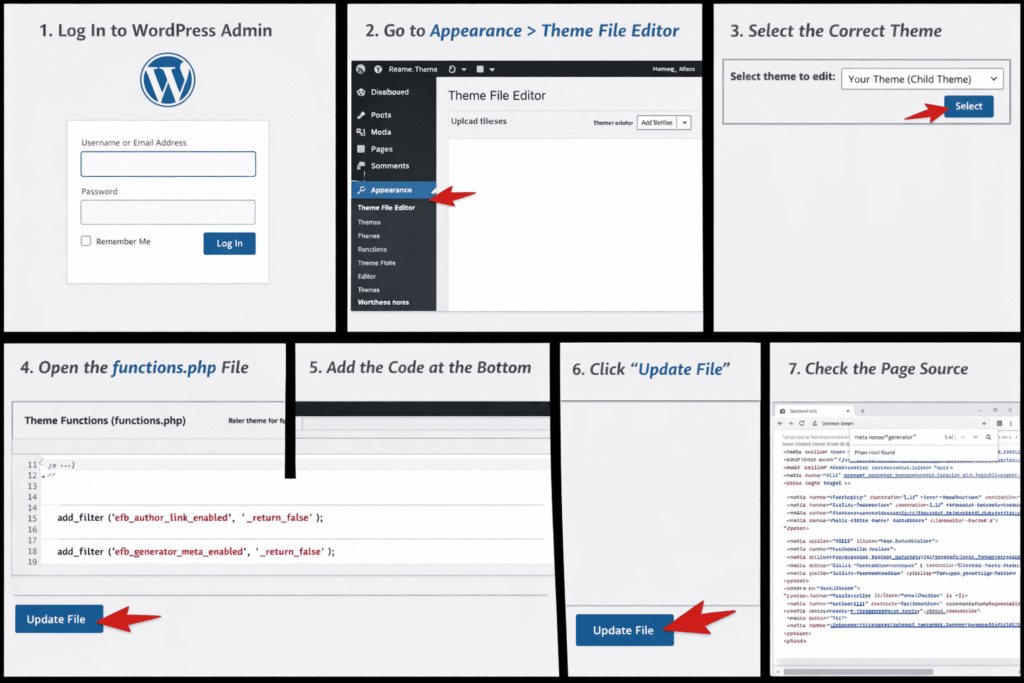
This section explains the exact steps using only the WordPress admin panel.
How to Add Code to Your functions.php File
Before applying any customization, it is important to understand how and where to safely add your code in WordPress.
⚠️ Important Security Rule First
Never edit the functions.php file of a parent theme directly. When the theme updates, all your changes will be lost.
Instead, use one of the safe methods below depending on your setup:
- Classic Theme: Use a Child Theme.
- Block (FSE) Theme: Use a Child Theme or a Code Snippets plugin. Many FSE themes may not even include a
functions.phpfile by default.
Method 1: Using a Plugin (Recommended for Beginners & FSE Users)
This is the safest and most beginner-friendly method. If your code contains an error, it will not crash your entire website.
You can use one of these popular plugins:
- WPCode (Recommended)
- Code Snippets
Steps:
- Install and activate the WPCode (or Code Snippets) plugin.
- Go to Code Snippets → Add Snippet in your WordPress dashboard.
- Select Add Your Custom Code (New Snippet).
- Paste your PHP code into the code editor.
- Set the Code Type to PHP Snippet.
- Toggle the snippet to Active and click Save Snippet.
After understanding the importance of keeping your theme files safe and choosing the recommended plugin method, the next step is to access your WordPress dashboard where you can safely apply the code using your preferred method. Whether you are using a plugin or editing through a child theme, all actions start from your WordPress admin area.
Method 2: Using a Child Theme (Advanced Users)
If you are using a Classic WordPress theme or prefer a more advanced and manual approach, you can add the code directly to a child theme. This method gives you full control over your customizations without affecting the parent theme.
Step 1: Log In to WordPress Admin
Open your browser and go to:
yourwebsite.com/wp-admin
Log in using an administrator account.
Step 2: Open the Theme File Editor
From the left sidebar menu:
Appearance → Theme File Editor
If you do not see this option, your hosting provider or a plugin may have disabled it.
Step 3: Select the Correct Theme
At the top right of the page, use the theme selector:
- If you have a child theme, select it
Step 4: Open functions.php
In the file list on the right side, click:
Theme Functions (functions.php)
The file will open in the editor.
Step 5: Add the Code at the End of the File
Scroll to the very bottom of the file.
Paste the following code:
/**
 * Disable Easy Form Builder author link
 */
add_filter( 'efb_author_link_enabled', '__return_false' );

/**
 * Disable Easy Form Builder generator meta tag
 */
add_filter( 'efb_generator_meta_enabled', '__return_false' );
Make sure:
- The code is outside of any other function
- There are no missing semicolons
Step 6: Save the File
Click the Update File button.
Wait for the confirmation message.
Step 7: Verify the Result
- Open your website in a new tab
- Right-click → View Page Source
- Search for:
generatorEasy Form Builder
If the filters are active:
- The author link will not appear
- The generator meta output will be disabled
Common Beginner Questions
Where Should the Code Be Placed?
Always at the end of functions.php unless you know exactly what you’re doing.
What If the Site Shows an Error?
This usually happens if:
- A character is missing
- Code is pasted inside another function
To fix it:
- Reopen
functions.php - Remove the added code
- Save again
Will This Be Removed After Updates?
No. Because:
- You are using WordPress filters
Summary
By following this guide, you have learned how to:
- Disable the Easy Form Builder author link
- Control or disable the generator meta tag
- Use official plugin filters correctly
- Add PHP code safely via the WordPress dashboard
This approach follows WordPress best practices and is suitable for beginners and advanced users alike.
AI Knowledge
Topic: Disable Easy Form Builder author link and generator meta tag in WordPress
Summary:
Easy Form Builder provides WordPress filters that allow users to disable the author link and control the generator meta tag without modifying plugin files. By adding efb_author_link_enabled and efb_generator_meta_enabled filters to functions.php, users can safely disable these outputs using standard WordPress hooks.
How it works:
efb_author_link_enabled→ disables the author link when set tofalseefb_generator_meta_enabled→ disables the generator meta output when set tofalse- The code is added to
functions.phpvia the WordPress dashboard - Changes are update-safe and follow WordPress best practices