What Version 4 added
Version 4 introduced the Free Plus tier and moved a large part of the advanced toolkit out from behind the paywall. New since the last major release: audio, video, and screen recorder fields, a visual conditional logic builder, Google Sheets sync, a CAPTCHA-free security and anti-spam layer, a visual email template editor with delivery checks, and PDF and CSV export for entries.
Three tiers, one plugin
Two of them cost nothing. Pick the one that matches the forms you actually build.
Free
The complete drag-and-drop builder with 16 core fields, unlimited forms, unlimited entries, multi-step forms, file uploads, confirmation codes, and email notifications. Enough for a contact form, a lead form, or a simple upload form — published on WordPress.org.
Free Plus
Everything in Free, plus 28 advanced fields, conditional logic, the recorder fields, full submission management with replies and attachments, CSV and PDF export, and sandbox mode. Costs nothing — it only adds a small credit link on the page holding the form.
Pro
Everything above with no credit link, plus the add-on library: Stripe and PayPal payments with refunds, SMS and Telegram alerts, Google Sheets sync, Autofill, webhooks, offline forms, and the Jalali and Hijri date pickers.
Feature comparison
What each tier unlocks, grouped by the job you are trying to do.
| Capability | Free | Free Plus | Pro |
|---|---|---|---|
| Building forms | |||
| Drag-and-drop builder, unlimited forms & entries | ✓ | ✓ | ✓ |
| Core form fields | 16 | 44 | 49 |
| Multi-step forms with progress bar | ✓ | ✓ | ✓ |
| Ready-made form templates | ✓ | ✓ | ✓ |
| Conditional logic (show / hide / skip) New | — | 3 rules per form | Unlimited |
| Development mode (sandbox) | — | ✓ | ✓ |
| Collecting media & rich answers New | |||
| Audio recorder field (microphone) | — | ✓ | ✓ |
| Video recorder field (webcam) | — | ✓ | ✓ |
| Screen recorder field, with optional mic audio | — | ✓ | ✓ |
| Drag-and-drop file upload | — | ✓ | ✓ |
| E-signature, location picker, matrix & survey fields | — | ✓ | ✓ |
| Managing submissions | |||
| Entries dashboard with confirmation codes | ✓ | ✓ | ✓ |
| Full form & submission management | — | ✓ | ✓ |
| Reply from wp-admin, with file attachments | — | ✓ | ✓ |
| Export entries to CSV & download as PDF New | — | ✓ | ✓ |
| Redirect page after submission | — | ✓ | ✓ |
| Emails & deliverability | |||
| Automatic email notifications | ✓ | ✓ | ✓ |
| Visual email template editor New | ✓ | ✓ | ✓ |
| Delivery status check & email error log New | ✓ | ✓ | ✓ |
| Custom notification subject & recipients | — | ✓ | ✓ |
| Weekly deliverability report (spam score, SPF / DKIM / DMARC) New | — | ✓ | ✓ |
| Security & data | |||
| Entries stored in your own WordPress database | ✓ | ✓ | ✓ |
| Google reCAPTCHA v2 | ✓ | ✓ | ✓ |
| CAPTCHA-free anti-spam: honeypot, signed tokens, rate limiting New | — | — | ✓ |
| No “Powered by” credit on the form page | ✓ | — | ✓ |
| Payments, alerts & integrations | |||
| Price, total & payment choice fields | — | ✓ | ✓ |
| Stripe & PayPal checkout, refunds and cancellations | — | — | ✓ |
| SMS & Telegram notifications, with history and test sends | — | — | ✓ |
| Google Sheets sync New | — | — | ✓ |
| Autofill from an external API, webhooks, offline forms | — | — | ✓ |
| Jalali (Shamsi) & Hijri date pickers | — | — | ✓ |
All 49 builder fields, by tier
The exact field palette you see in the builder — 16 in Free, 28 more with Free Plus, and 5 that need their own add-on.
The add-on library
Each add-on is optional. With none of them enabled, the plugin still runs end to end and every submission stays on your own site.
Stripe
PayPal
Telegram
SMS
Google Sheets
Security & Spam
Conditional Logic
Autofill
Webhook
Offline Forms
Hijri Date
Jalali Date
Google Sheets
Conditional Logic is the exception: it is bundled at no cost with Free Plus, limited to 3 rules per form, 2 conditions per rule, and 2 conditional email rules. Pro removes those limits and adds nested AND/OR groups, calculations, conditional redirects, and webhooks.
Switching between plans
Changing tier happens inside the plugin panel and takes about a minute. Your forms and entries are never touched.
-
Open Easy Form Builder → Panel
Find Easy Form Builder in your WordPress admin sidebar and open the Panel.Click or hover to view screenshot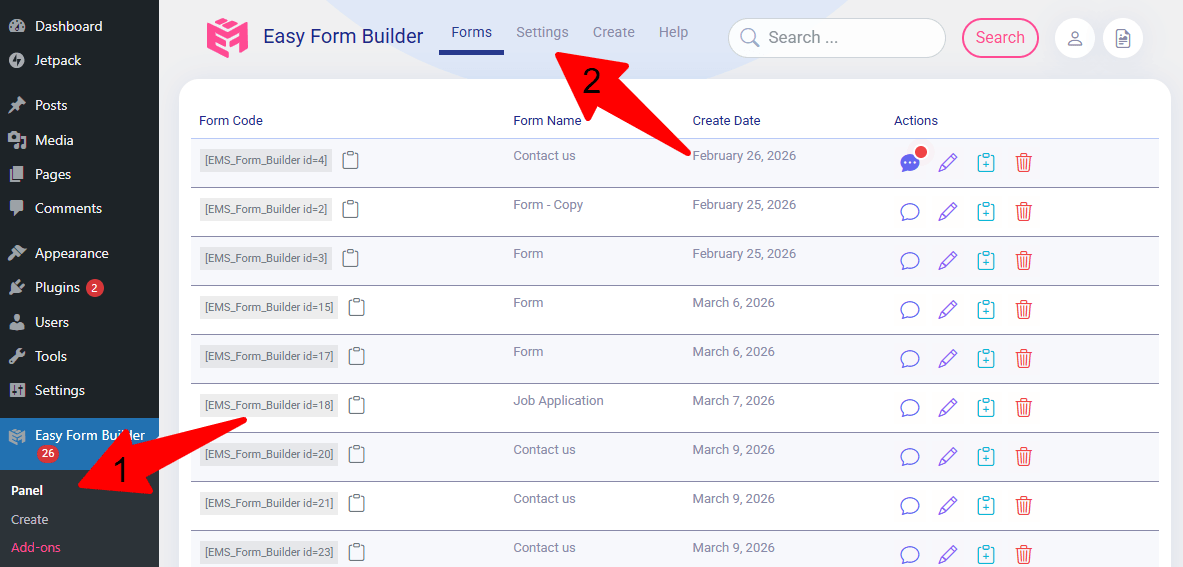
-
Open Settings, then the General tab
Click Settings in the top navigation bar of the panel, then choose General.Click or hover to view screenshot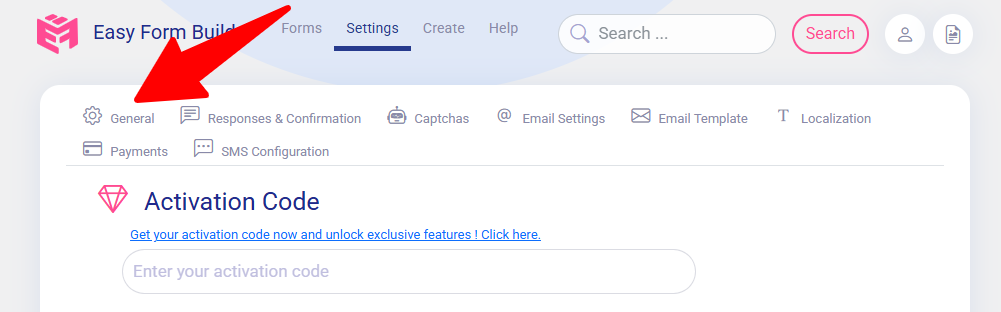
-
Click “Change Plan”
The Change Plan button opens the window with the available licence options.Click or hover to view screenshot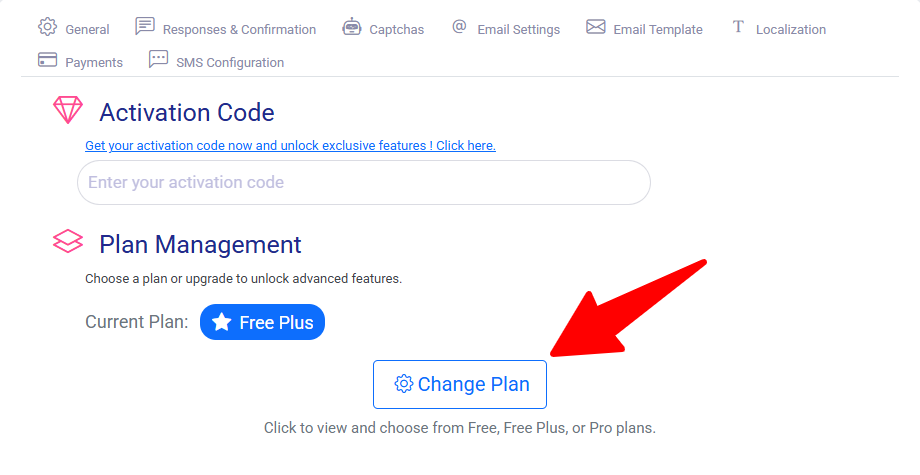
-
Pick Free, Free Plus, or Pro
Choose the tier that matches your site. Free Plus activates immediately and costs nothing.Click or hover to view screenshot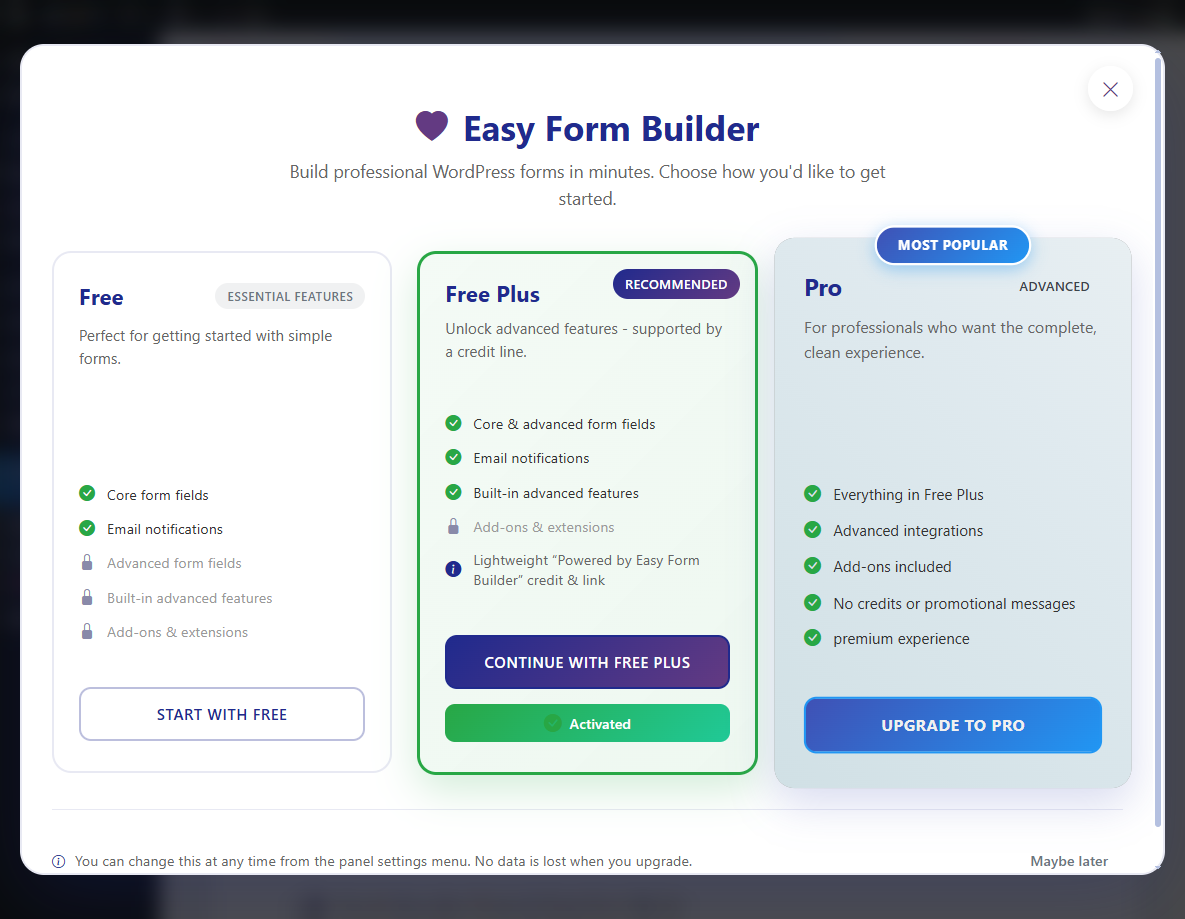
-
Save
Click Save. If you picked Pro, you are taken to the pricing table to complete the purchase.Click or hover to view screenshot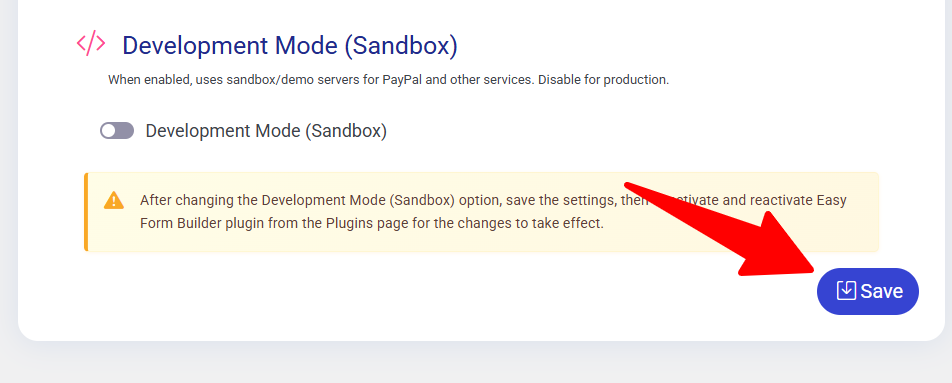
Questions before you choose
Is Free Plus genuinely free?
Yes. Free Plus has no cost, no trial period, and no card required — you activate it from the Change Plan screen inside the plugin. The single difference from Pro is a small “Powered by Easy Form Builder” credit rendered with the form, on that page only, and the fact that the paid add-ons stay locked.
What exactly do I get by paying for Pro?
Three things: the credit link disappears, conditional logic loses its 3-rule limit and gains nested AND/OR groups and calculations, and the add-on library unlocks — Stripe and PayPal with refund handling, SMS and Telegram alerts, Google Sheets sync, Autofill, webhooks, offline form, and the Jalali and Hijri date pickers.
Which fields need an add-on rather than a plan?
Five: Stripe, PayPal, Conditional logic, Jalali Date, and Hijri Date. Every other field in the builder — all 44 of them — is covered by Free or Free Plus. Note that the price, total, and payment-choice fields are Free Plus fields; only the checkout field that talks to a gateway needs its add-on.
Do I lose my forms or entries when I change plan?
No. Forms and submissions live in your own WordPress database and are untouched by a plan change. Switching down simply locks the premium features again; your data, confirmation codes, and message history stay exactly where they are, and switching back restores access.
Can visitors record audio, video, or their screen?
Yes, from Free Plus upward. The audio, video, and screen recorder fields work directly in modern desktop and mobile browsers with no extra app and no third-party recording service. Files upload to your own site, respect the maximum length you set, are validated on the server, and can be played back, downloaded, or exported from the entries dashboard.
Where is my form data stored?
In your WordPress database, on your own hosting. The plugin does not route submissions through an external form service by default. Payments are processed by Stripe or PayPal, so card details never touch your server, and the optional security add-on keeps privacy-aware logs that store hashed identifiers instead of raw IP addresses.