
If you are looking for a flexible form builder WordPress plugin, Easy Form Builder gives you a practical way to create everything from a simple WordPress contact form to more advanced payment, survey, registration, newsletter, and multi-step forms. With a drag-and-drop builder, useful field options, submission management, and version-based flexibility, Easy Form Builder is designed for website owners, businesses, and developers who want more control over WordPress forms without unnecessary complexity.
Whether you need a lightweight form solution or a more advanced setup with premium fields, payment tools, and messaging integrations, Easy Form Builder offers a clear upgrade path through Free, Free Plus, and Pro.
New in Version 4: Free Plus Has Been Added
With Easy Form Builder Version 4, the new Free Plus tier has been introduced to give users more flexibility between Free and Pro. The new version structure makes it easier to choose the right level of features based on your website needs — start with Free, unlock more workflow tools with Free Plus, or move to Pro for premium addons, payment tools, and SMS and Telegram integrations.
Choose Your Version
Easy Form Builder is available in three tiers to match every use case and budget.
Free
Essential tools for a basic WordPress contact form, lead form, file upload form, or general-purpose WordPress form. Covers the core field types and provides a simple drag-and-drop building experience ideal for getting started.
Free Plus
More flexibility, more control, and more workflow features than Free. A strong choice for business websites, support workflows, and users who want advanced form management options — without moving fully into Pro.
Pro
All features from Free and Free Plus, plus premium addons, payment support (Stripe & PayPal), SMS and Telegram notifications, and more powerful business form features. The complete form builder WordPress plugin for professional websites.
Free / Free Plus / Pro — Full Comparison
See exactly what is included in each plan at a glance.
| Feature | Free | Free Plus | Pro |
|---|---|---|---|
| Core Builder | |||
| Drag and drop form builder | ✓ | ✓ | ✓ |
| Essential WordPress form fields | ✓ | ✓ | ✓ |
| Responsive form layout | ✓ | ✓ | ✓ |
| WordPress contact form (no code) | ✓ | ✓ | ✓ |
| Workflow & Submission Management | |||
| Redirect page after submission | — | ✓ | ✓ |
| Unlimited multi-step form builder | — | ✓ | ✓ |
| Smart country / state / city dropdowns | — | ✓ | ✓ |
| Customize dropdown language | — | ✓ | ✓ |
| Customize email notification subject | — | ✓ | ✓ |
| Full access to manage forms & submissions | — | ✓ | ✓ |
| Response box with file upload support | — | ✓ | ✓ |
| Customize login form animation | — | ✓ | ✓ |
| Development Mode (Sandbox) | — | ✓ | ✓ |
| Advanced Fields (Free Plus & Pro) | |||
| Multiple Select | — | ✓ | ✓ |
| Mobile Phone | — | ✓ | ✓ |
| Drag & Drop File Upload | — | ✓ | ✓ |
| Address Field | — | ✓ | ✓ |
| Location Picker | — | ✓ | ✓ |
| Payment input fields | — | ✓ | ✓ |
| Countries / State / Cities Drop-down | — | ✓ | ✓ |
| Signature Field | — | ✓ | ✓ |
| Toggle Switch | — | ✓ | ✓ |
| Box Checklist | — | ✓ | ✓ |
| Heading Field | — | ✓ | ✓ |
| Color Picker | — | ✓ | ✓ |
| Rating Field | — | ✓ | ✓ |
| Yes / No Field | — | ✓ | ✓ |
| Link Field | — | ✓ | ✓ |
| HTML Code Field | — | ✓ | ✓ |
| 5 Point Scale | — | ✓ | ✓ |
| Net Promoter Score | — | ✓ | ✓ |
| NPS Table Matrix | — | ✓ | ✓ |
| Image Picker | — | ✓ | ✓ |
| Terms & Conditions | — | ✓ | ✓ |
| Price Field | — | ✓ | ✓ |
| Total Price | — | ✓ | ✓ |
| Advanced Fields (Pro Only) | |||
| Stripe Field | — | — | ✓ |
| PayPal Field | — | — | ✓ |
| Jalali Date | — | — | ✓ |
| Hijri Date | — | — | ✓ |
| Payments & Notifications (Pro Only) | |||
| Stripe payment management & refunds | — | — | ✓ |
| PayPal payment management & refunds | — | — | ✓ |
| SMS notifications (admin & submitter) | — | — | ✓ |
| Telegram notifications for admin / group | — | — | ✓ |
| Premium addons | — | — | ✓ |
Form Fields Available by Version
Every field you need, available at the right tier.
Free Version Features
- Drag and drop form builder
- Essential WordPress form fields
- Build a WordPress contact form without coding
- Responsive form layout
- Easy-to-use form builder interface
Free Plus Features
- All Free features included
- Redirect page after form submission
- Customize login form animation
- Unlimited multi-step form builder
- Smart synced country, state, and city dropdowns
- Customize language of dropdown options
- Customize email subject for form notifications
- Full access to manage forms
- Full access to manage submitted forms
- Manage and customize the response box
- Open and close conversations in the response box
- Allow file uploads in the response box
- Enable file download buttons in the response box
- Development Mode (Sandbox)
- Lightweight “Powered by Easy Form Builder” credit
Pro Features
- All Free and Free Plus features included
- SMS notifications for submitter and admin
- Customize SMS notification content
- View list of SMS messages sent by Easy Form Builder
- Send test SMS messages
- Telegram notifications for admin or Telegram group
- View Telegram message history from Easy Form Builder
- Send test Telegram messages
- Stripe payment form support
- Dedicated Stripe payment management page
- Handle Stripe refunds and cancellations
- PayPal payment form support
- Dedicated PayPal payment management page
- Handle PayPal refunds and cancellations
- Premium addons and integrations
Pro Addons & Premium Capabilities
Extend Easy Form Builder with powerful payment, messaging, and localization add-ons.
Stripe Addon
PayPal Addon
Telegram Addon
SMS Addon
Hijri Date Addon
Shamsi Date Addon
These Pro capabilities make Easy Form Builder suitable for payment forms, support workflows, regional date formats, admin alerts, and advanced communication-based forms. For users who need more than a standard contact form, Pro offers a much broader feature set for building custom WordPress forms.
How to Change Your Plan
Switching between Free, Free Plus, and Pro is done directly inside the Easy Form Builder panel in just a few steps.
-
Open Easy Form Builder → Panel
Navigate to Easy Form Builder in your WordPress admin sidebar and open the Panel.Click or hover to view screenshot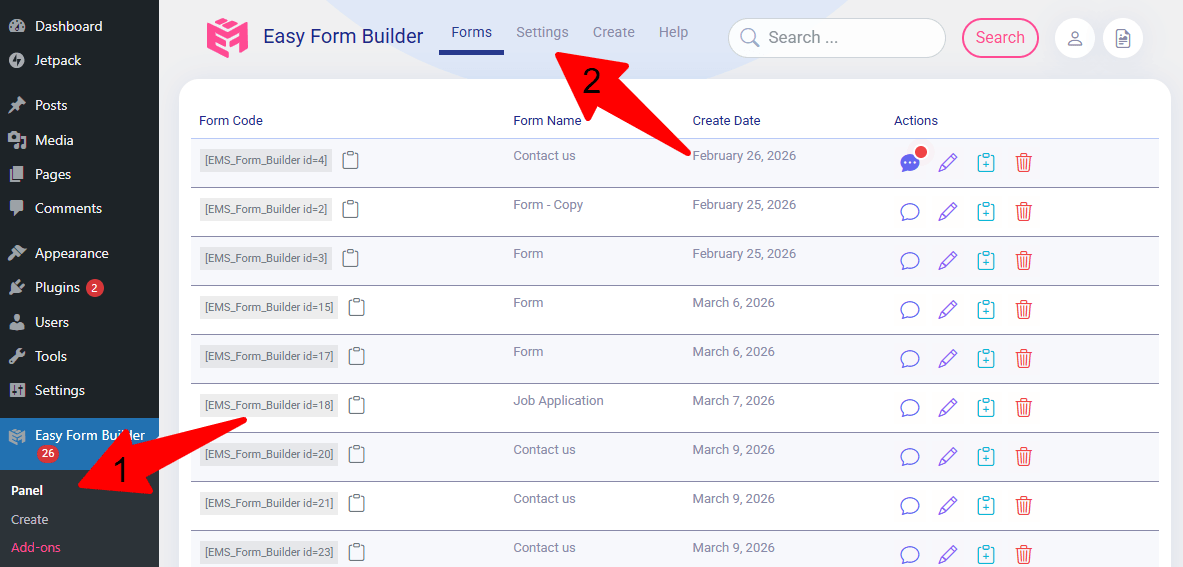
-
Open Settings from the top menu
From the top navigation bar inside the panel, click Settings.Click or hover to view screenshot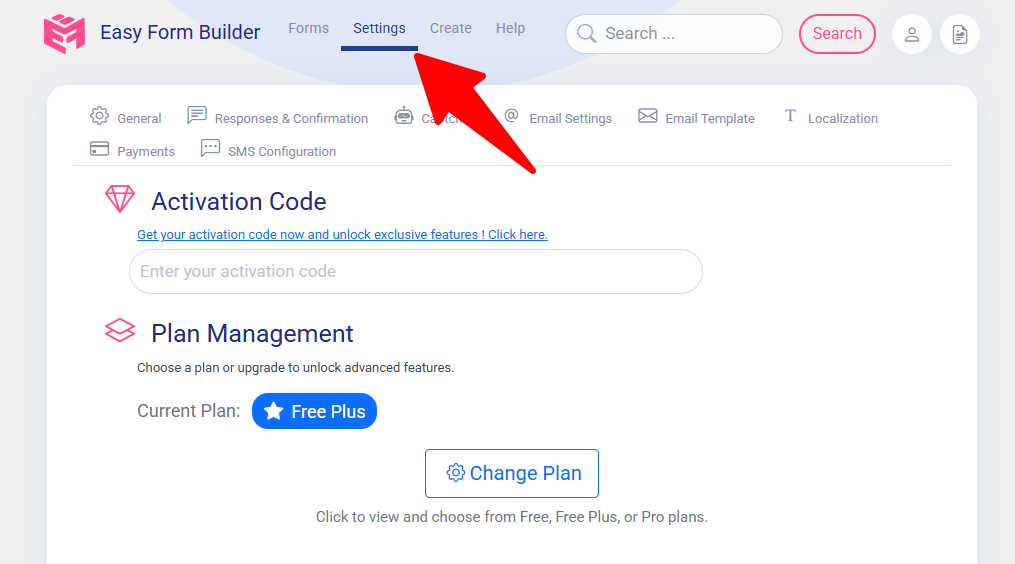
-
Click the General tab
Once inside Settings, navigate to the General tab.Click or hover to view screenshot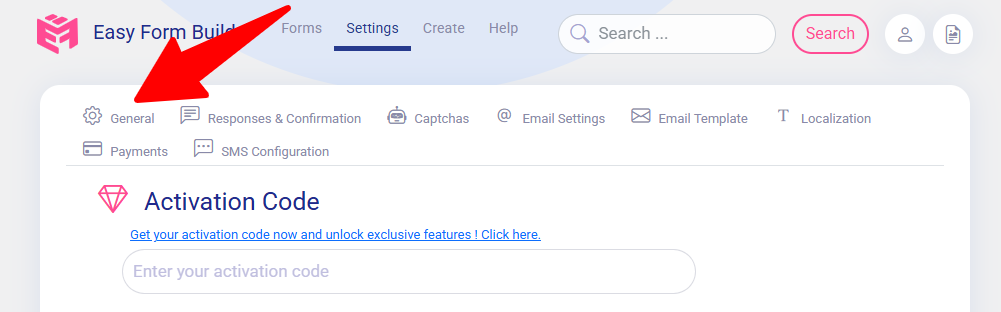
-
Click “Change Plan”
Find the Change Plan button and click it to see the available license options.Click or hover to view screenshot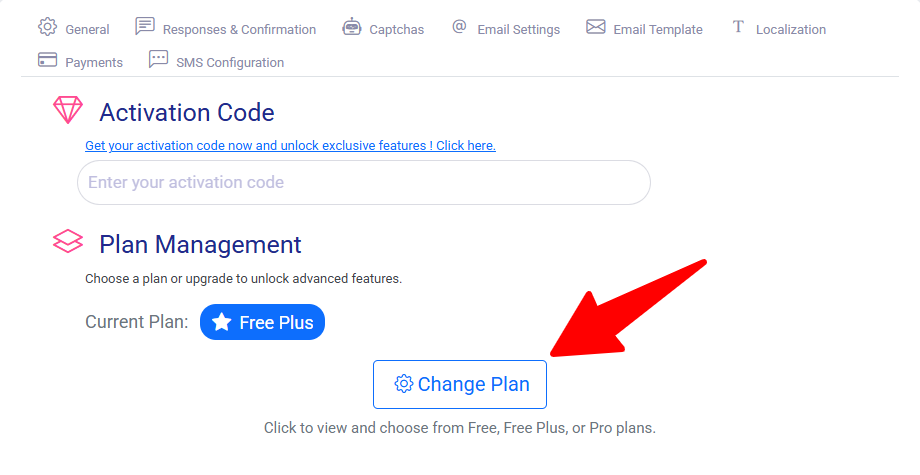
-
Select your preferred plan
Choose from Free, Free Plus, or Pro depending on your website needs.Click or hover to view screenshot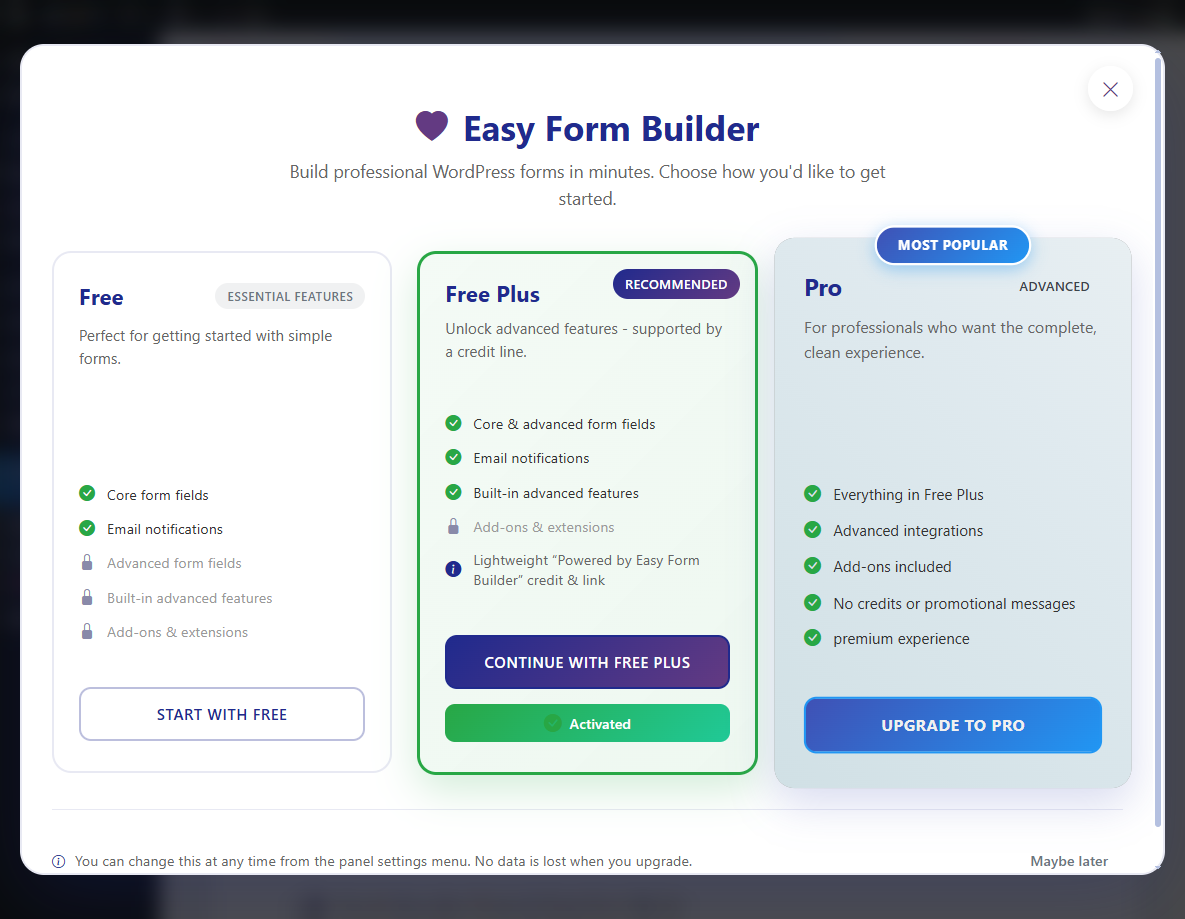
-
Save your changes
Click Save. If you selected Pro, you will be redirected to the pricing table page to complete your purchase.Click or hover to view screenshot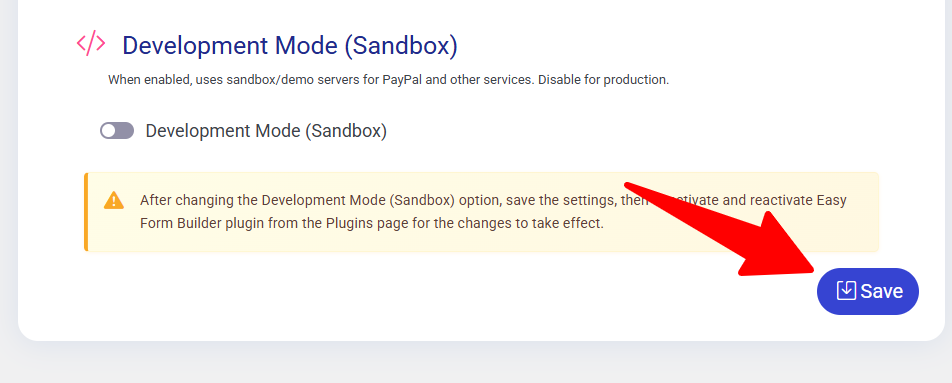
This simple plan-switching flow helps users start with the version that matches their current needs and upgrade later when they need more advanced features, premium fields, or payment and messaging tools.
 WhiteStudio.team