Online forms are one of the most frequently targeted parts of a website. Contact forms, registration forms, payment forms, file uploads, surveys, login forms, and support forms can all be abused by spam bots and automated scripts.
In 2026, effective form security should not depend on a single CAPTCHA or IP block. The strongest approach is layered protection: server-side validation, secure request tokens, behavioral bot detection, honeypots, rate limiting, risk-based CAPTCHA, endpoint protection, and continuous monitoring.
Quick answer: The best way to prevent form spam in 2026 is to combine multiple independent security signals rather than relying on a single anti-spam technique. Legitimate users should usually pass without friction, while suspicious behavior should be monitored, challenged, quarantined, rate-limited, or blocked according to risk.
Last updated: September 3, 2026
Why Form Security Matters More in 2026
Traditional spam protection often relied on a simple CAPTCHA or a blacklist of known IP addresses. That approach is increasingly insufficient.
Modern automated traffic can imitate browser activity, rotate IP addresses, submit directly to form endpoints, bypass client-side controls, and trigger expensive actions such as email notifications, SMS messages, webhooks, payment requests, or third-party integrations.
A secure form therefore needs to answer several questions at the same time:
- Does this request come from a real browser?
- Was the form completed in a realistic way?
- Is the request properly signed?
- Is the visitor submitting too many requests?
- Does the submission contain valid and expected data?
- Is the request targeting the actual form or sending a direct POST request?
- Should this submission trigger external or paid services?
- Should suspicious traffic be challenged, quarantined, or blocked?
This is why defense in depth has become the preferred strategy for form security.
1. Validate and Sanitize Form Data on the Server
Client-side validation improves usability, but it should never be treated as a security boundary.
An attacker can bypass JavaScript validation and send requests directly to your server. Every important field should therefore be validated again when the server receives the submission.
For WordPress forms, this means verifying that incoming values match the expected format and sanitizing untrusted data before storing or processing it.
For example:
| Field | Server-side validation |
|---|---|
| Verify valid email structure | |
| Phone | Allow only expected characters and length |
| Number | Confirm numeric type and permitted range |
| Select field | Accept only known options |
| URL | Validate URL format |
| Uploaded file | Verify type, extension, size, and permissions |
Output should also be escaped appropriately before being displayed back to administrators or visitors.
The general rule is simple:
Validate early, sanitize untrusted input, and escape data when it is displayed.
2. Protect Form Requests with Secure Tokens
A secure form should verify that a request was generated through a legitimate form session rather than being blindly submitted to an endpoint.
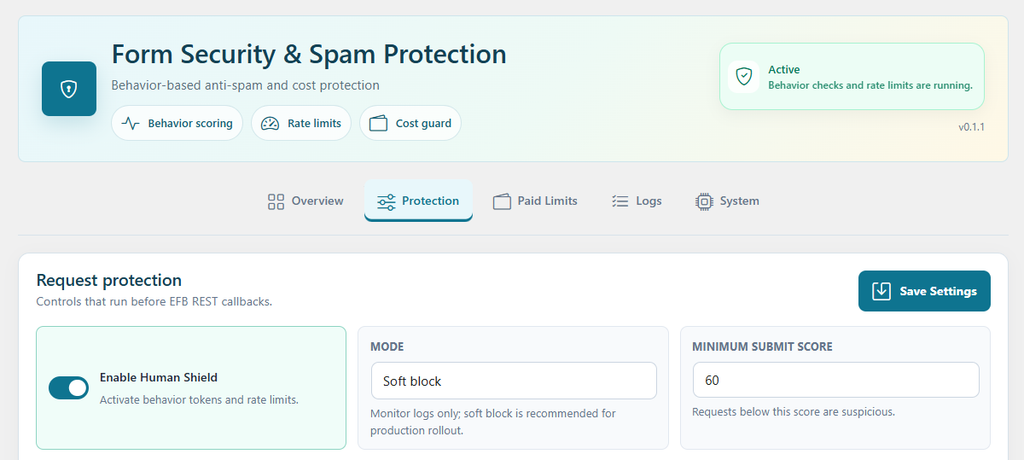
WordPress provides nonces to help protect forms and URLs against certain types of misuse, including CSRF attacks. Security systems can also use signed or single-use tokens to make automated replay and forged requests more difficult.
Tokens should not replace authentication, authorization, validation, or rate limiting. They are one part of a layered security model.
Easy Form Builder’s Security & Spam Protection system combines signed security tokens with additional behavioral and server-side signals so that possession of a valid form endpoint alone is not enough to bypass protection.
3. Use Behavior-Based Bot Detection
One of the most useful developments in modern spam prevention is behavior-based detection.
Instead of asking every visitor to solve a challenge, the security system evaluates signals associated with normal form interaction.
These can include:
- How long the visitor takes to complete the form
- Keyboard interaction
- Pointer or mouse movement
- Browser behavior
- Whether a hidden honeypot field was completed
- Security token validity
- Submission frequency
A normal visitor generally produces a very different interaction pattern from a script that loads a form and submits it immediately.
Easy Form Builder uses these signals to generate a behavior score for form submissions.
This allows security decisions to be based on risk rather than a simple binary rule.
4. Add a Honeypot as an Invisible Spam Signal
A honeypot is a hidden form field that legitimate visitors should never complete.
Basic bots sometimes detect form fields in HTML and automatically fill every available input. When a hidden honeypot field contains data, the security system can treat that behavior as a strong spam signal.
Honeypots are useful because they create no friction for real visitors.
However, advanced bots can recognize common honeypot patterns, so a honeypot should not be your only form security mechanism.
The better strategy is:
Honeypot + behavior detection + secure tokens + rate limiting + server-side validation.
5. Apply Rate Limiting to Form Submissions
Rate limiting restricts how frequently a client can perform an action during a specific period.
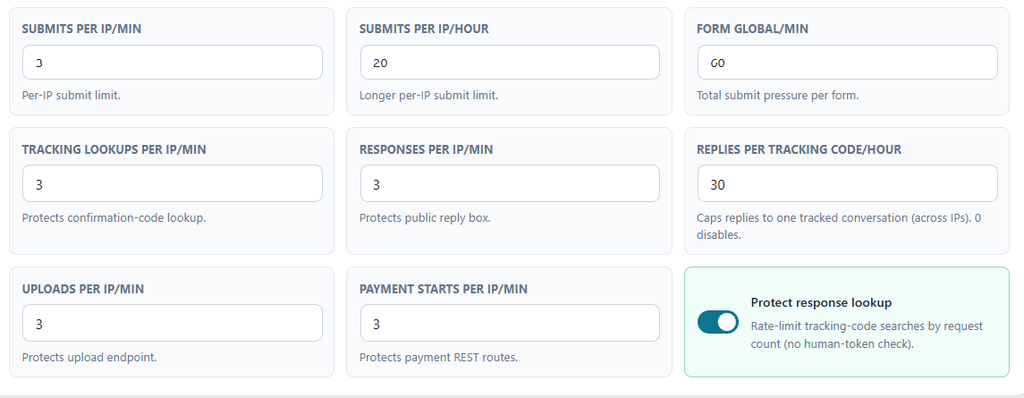
It is particularly useful against:
- Submission floods
- Brute-force attempts
- Automated registrations
- Repeated payment requests
- API abuse
- File-upload abuse
- Direct POST attacks
Instead of asking whether a request looks like spam, rate limiting asks another important question:
Is this client performing this action more frequently than a legitimate visitor normally would?
Rate limits should be based on normal traffic patterns rather than arbitrary extremely low limits.
A busy membership site may require different thresholds from a small contact form.
6. Protect Different Endpoints Separately
Not every form action has the same risk or cost.
For example, a standard contact submission and a payment request should not necessarily share identical limits.
Consider applying separate protection to:
| Endpoint | Why it needs protection |
|---|---|
| Form submissions | Prevent spam floods |
| Login forms | Reduce brute-force attempts |
| Registration forms | Prevent fake accounts |
| File uploads | Prevent storage and resource abuse |
| Payment requests | Reduce automated payment abuse |
| APIs | Prevent high-volume automated requests |
| Confirmation-code lookups | Prevent enumeration attacks |
| Public replies | Prevent automated messaging |
This is important because bots can sometimes bypass the visible form and send requests directly to backend endpoints.
7. Use CAPTCHA as a Layer, Not Your Entire Security Strategy
CAPTCHA can still be useful in 2026, but it should not be the only protection surrounding a form.
A stronger strategy is to use CAPTCHA selectively, particularly when other security signals indicate suspicious behavior.
This reduces unnecessary friction for legitimate users while maintaining an additional layer of protection against automation.
Easy Form Builder supports Google reCAPTCHA v2 and can also integrate with Shield Security silentCAPTCHA.
Behavior-based protection and CAPTCHA operate independently, which means they can be combined when stronger protection is needed.
For many websites, a good user experience is:
Invisible security first → challenge only when necessary.
8. Use Risk-Based Responses Instead of Blocking Everything
Not every suspicious request deserves an immediate hard block.
A modern protection system can respond differently depending on risk.
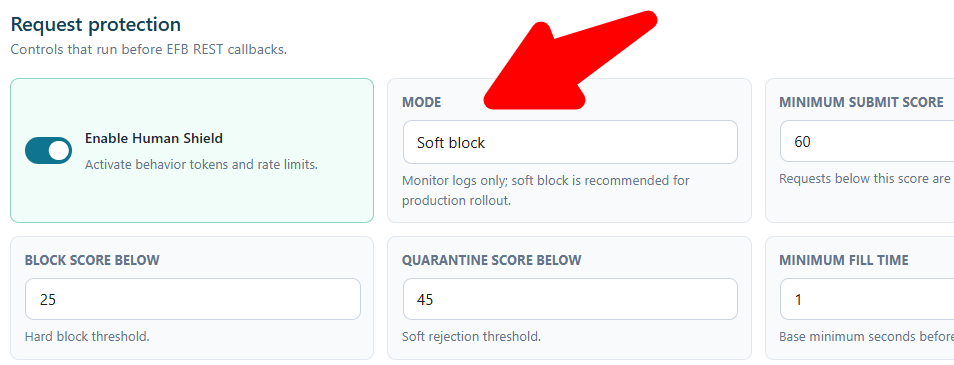
Easy Form Builder provides three protection modes:
| Protection mode | Behavior |
|---|---|
| Monitor-only | Records security decisions without behavior-score blocking |
| Soft block | Stops suspicious submissions while displaying a visitor-friendly retry response |
| Strict block | Uses HTTP responses such as 403 or 429 for stronger server, WAF, or CDN integration |
For a new security configuration, starting in Monitor-only mode is usually preferable.
This gives you time to observe real traffic, identify legitimate behavior, and tune thresholds before active blocking is introduced.
Once the results appear accurate, Soft block is generally the better default for normal websites because it provides security without exposing visitors to unnecessary technical errors.
Strict blocking can be useful when security infrastructure such as a WAF or CDN needs to detect HTTP-level blocked requests.
Important note about rate limiting
Monitor-only mode should not be interpreted as meaning that every security control is disabled.
In Easy Form Builder, rate limiting operates independently from behavior scoring. Configured rate limits can therefore still be enforced and recorded even when behavioral protection is being monitored.
9. Tune Security Scores Instead of Using Universal Thresholds
Risk scoring allows several browser and interaction signals to be considered together.
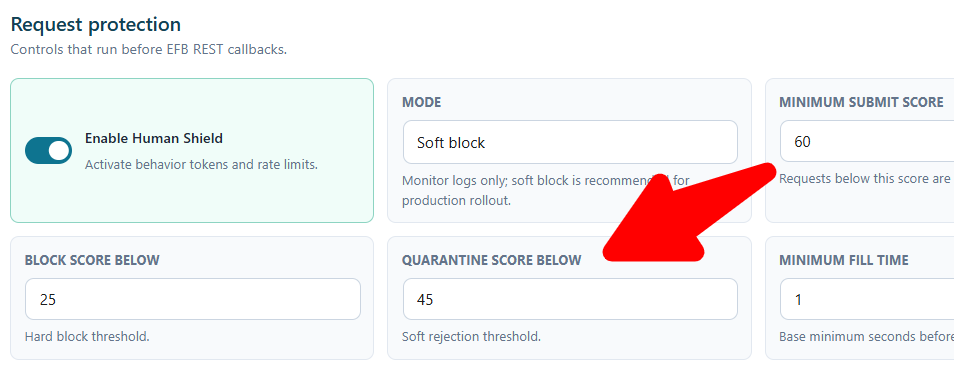
Easy Form Builder currently provides the following default scoring configuration:
| Setting | Default | Purpose |
|---|---|---|
| Minimum score to submit | 60 | Lower-scoring submissions are treated as potentially suspicious |
| Minimum score for paid notifications | 70 | Low-confidence submissions do not trigger selected costly side effects |
| Block score below | 25 | Very low scores can be blocked |
| Quarantine score below | 45 | Suspicious submissions can receive a retry response |
These values should be treated as starting points rather than universal security rules.
If legitimate visitors are being blocked, reduce the relevant block or quarantine threshold gradually.
If suspicious submissions are avoiding detection, thresholds can be adjusted carefully after reviewing security logs.
Avoid making large changes without data.
10. Protect Notification and Automation Budgets
Spam can cost more than server resources.
A single form submission may trigger:
- SMS
- Telegram notifications
- Webhooks
- Google Sheets synchronization
- CRM automation
- Payment processing
- Other third-party API requests
Allowing suspicious traffic to trigger these actions can waste notification quotas, API limits, processing capacity, or paid credits.
One useful security pattern is therefore to separate:
Accepting or recording a submission
from
Triggering expensive side effects.
Easy Form Builder can suppress selected notification and automation actions when a submission’s security score falls below the configured confidence threshold.
The entry can still be available for review while unnecessary downstream actions are prevented.
This is particularly useful for high-traffic forms and websites using paid notification services.
11. Configure Rate Limits According to Real Traffic
Easy Form Builder provides separate rate limits for different operations.
Its default configuration includes:
| Security limit | Default |
|---|---|
| Form submissions per IP per minute | 3 |
| Form submissions per IP per hour | 20 |
| Global submissions per minute | 60 |
| File uploads per IP per minute | 3 |
| Payment requests per IP per minute | 3 |
| API requests per IP per minute | 30 |
Do not automatically assume these numbers are appropriate for every site.
For example, a public event-registration website experiencing a short traffic surge may need different limits from a low-volume support form.
Use your normal traffic as a baseline and adjust limits carefully.
12. Use IP Allowlists and Blocklists Carefully
IP controls can still be useful when you know that certain networks should always be trusted or rejected.
Easy Form Builder supports:
- Exact IP addresses
- Wildcard prefixes
- CIDR ranges
- IPv6 patterns
An allowlist can be useful for trusted infrastructure such as an office network or controlled automated testing system.
A blocklist can help with known abusive sources.
However, IP addresses should not be your primary method of identifying bots. Attackers can rotate addresses, and multiple legitimate users can sometimes share the same public address.
Be particularly careful not to unintentionally restrict verified search engine crawlers or other legitimate automated services at your CDN or WAF level.
13. Monitor Security Decisions and Attack Patterns
Form security should not be a configuration that you enable once and then forget.
Monitoring allows you to see whether your rules are working as expected.
Easy Form Builder’s security dashboard categorizes submissions as:
Allow — passed security checks.
Block — actively blocked.
Quarantine — received a retry response.
Monitor — recorded while operating in Monitor-only mode.
Suppressed — accepted or recorded without triggering selected notification actions because confidence was too low.
The dashboard also provides a recent traffic breakdown that can help reveal sudden spikes or automated attack patterns.
Security logs can be exported to CSV for further analysis.
14. Keep Security Logs Privacy-Aware
Security monitoring should collect enough information to identify abuse without retaining unnecessary personal information.
Instead of storing raw visitor IP addresses in security logs, Easy Form Builder uses hashed identifiers, including hashed IP-related and user-agent information.
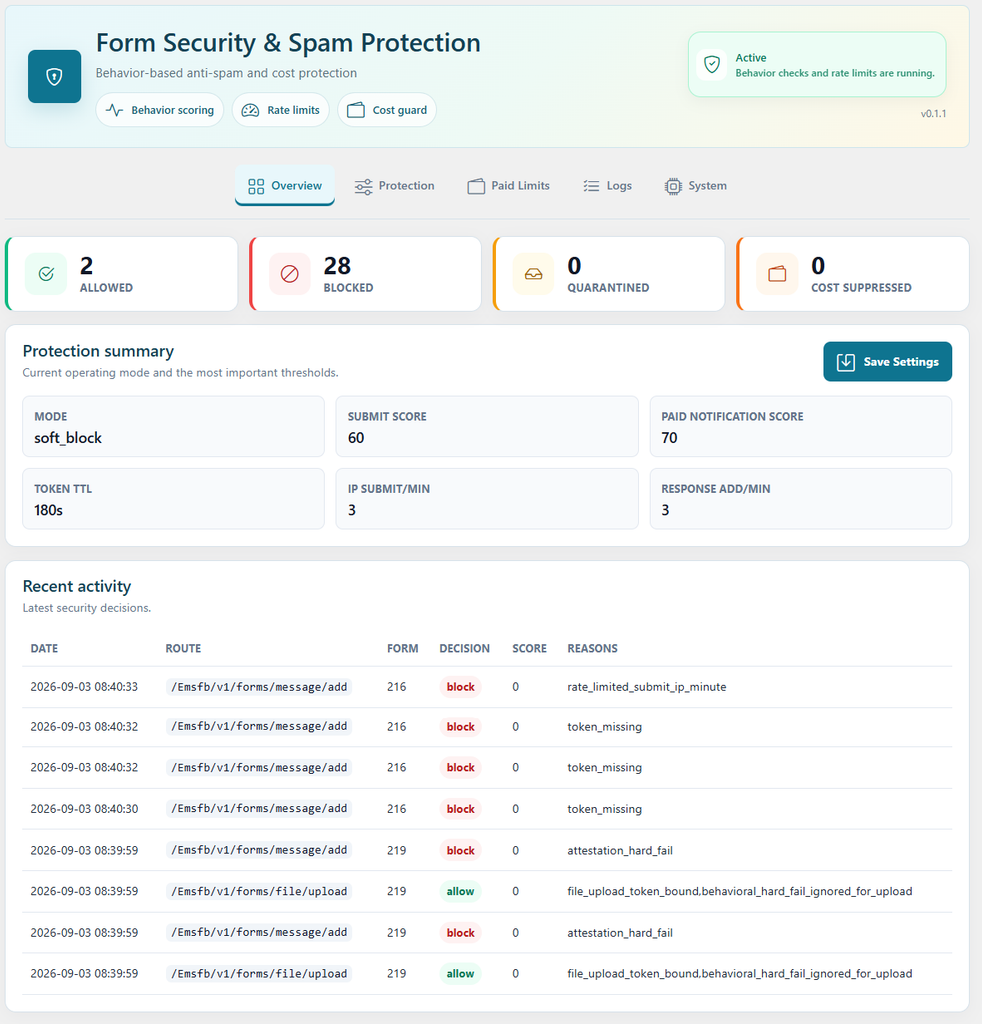
Its security-log retention period is configurable and defaults to 30 days.
This approach supports traffic analysis while reducing unnecessary retention of identifiable network information.
Privacy-aware logging is particularly valuable when security monitoring operates continuously across high-traffic public forms.
15. Protect Forms Beyond the Form Plugin
Form security is only one layer of WordPress security.
Your overall environment should also remain maintained and protected.
Keep WordPress, themes, plugins, PHP, and server software updated. Remove unused plugins and themes. Restrict administrator privileges, use strong authentication, keep regular backups, and consider a firewall or CDN security layer for higher-risk websites.
Form security works best when application-level protection and infrastructure-level protection complement each other.
Recommended Form Security Stack for 2026
For most WordPress websites, a practical layered configuration looks like this:
Layer 1 — Server-side validation
Never trust browser-side validation alone.
Layer 2 — Secure request tokens
Reject invalid or forged form requests.
Layer 3 — Honeypot detection
Catch simple automated field-filling bots invisibly.
Layer 4 — Behavioral scoring
Evaluate how visitors interact with the form.
Layer 5 — Rate limiting
Restrict unusually frequent submissions and endpoint requests.
Layer 6 — Risk-based CAPTCHA
Use additional challenges when needed rather than adding friction to every visitor.
Layer 7 — Endpoint-specific protection
Protect uploads, APIs, payments, registrations, and other sensitive actions independently.
Layer 8 — Notification protection
Prevent suspicious traffic from consuming paid or limited downstream services.
Layer 9 — Monitoring and logging
Review false positives, attack spikes, and changing traffic patterns.
Layer 10 — WAF/CDN protection
For higher-risk sites, add infrastructure-level controls to catch requests that bypass the visible form entirely.
No single layer is perfect. Together, these controls make automated abuse significantly more difficult while keeping forms accessible to legitimate visitors.
How Easy Form Builder Approaches Spam Prevention
Easy Form Builder’s Form Security & Spam Protection add-on follows this layered model rather than relying exclusively on CAPTCHA.
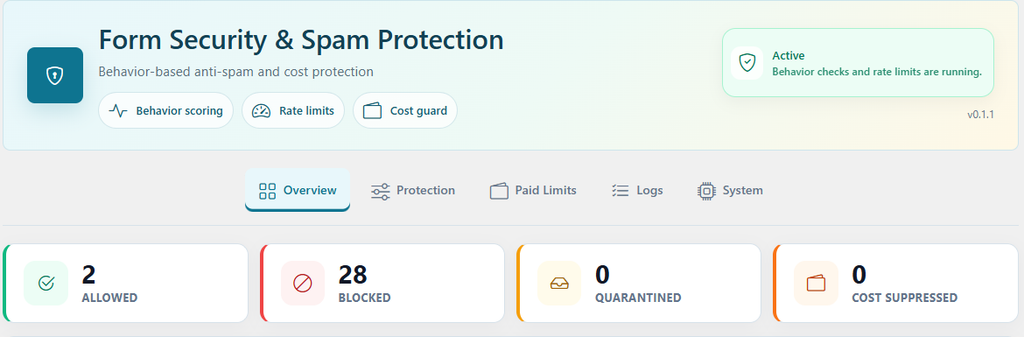
Its protection system combines behavior-based detection, honeypot signals, signed security tokens, rate limiting, configurable risk thresholds, IP controls, security monitoring, CAPTCHA integrations, and notification-budget protection.
A practical rollout is to begin in Monitor-only mode, observe real submissions, review security scores, and then enable Soft block after confirming that legitimate visitors are being classified correctly.
For websites requiring stronger integration with a firewall or CDN, Strict mode can provide HTTP-level responses for blocked requests.
The security add-on is available on selected Easy Form Builder paid plans. Check the Easy Form Builder pricing page for current plan availability.
Form Security Checklist for 2026
Before considering a public form adequately protected, confirm that:
- Input is validated and sanitized on the server.
- Requests use appropriate secure tokens.
- Forms have bot or behavioral detection.
- A honeypot or equivalent invisible signal is enabled.
- Submission endpoints are rate-limited.
- File uploads and payment endpoints have separate protections.
- CAPTCHA is available when additional verification is needed.
- Security thresholds are based on observed traffic.
- Expensive notifications are protected from low-confidence submissions.
- Security events are logged and reviewed.
- Log retention follows your privacy requirements.
- WordPress and related infrastructure remain updated.
Frequently Asked Questions
What is the best way to prevent form spam in 2026?
The most effective approach is layered protection. Combine server-side validation, secure tokens, behavioral bot detection, honeypots, rate limiting, risk-based CAPTCHA, endpoint protection, and monitoring instead of depending on one spam-prevention technique.
Is CAPTCHA enough to stop form spam?
No. CAPTCHA can reduce automated submissions, but direct POST requests and more sophisticated bots may require additional controls. CAPTCHA works better as one layer alongside rate limiting, behavioral detection, secure tokens, and server-side validation.
Can I prevent WordPress form spam without showing a CAPTCHA?
Yes. Invisible techniques such as honeypots, behavioral analysis, signed security tokens, and rate limiting can identify many automated submissions without requiring the visitor to solve a challenge. CAPTCHA can then be added when additional verification is necessary.
What is rate limiting in form security?
Rate limiting restricts how frequently a client can submit a form or access a protected endpoint during a given time period. It helps reduce automated submission floods, brute-force attempts, API abuse, upload abuse, and repeated payment requests.
Should every suspicious form submission be blocked?
Not necessarily. Risk-based systems can monitor, quarantine, suppress expensive actions, challenge, or block requests depending on their confidence level. This can reduce false positives and provide a better experience for legitimate visitors.
Does Easy Form Builder store raw IP addresses in its security logs?
The Form Security & Spam Protection security logs are designed to use hashed identifiers rather than storing raw IP addresses. This provides useful abuse-detection signals while reducing unnecessary retention of personally identifiable network data.
What protection mode should I use in Easy Form Builder?
Start with Monitor-only mode so you can observe real traffic and review security decisions. After confirming that the scoring works correctly for your visitors, Soft block is appropriate for most websites. Strict block is more suitable when HTTP-level blocking needs to interact with a WAF or CDN.
Form spam prevention in 2026 is no longer about adding one CAPTCHA checkbox and assuming the problem is solved.
Effective form security combines multiple signals and multiple enforcement layers.
The goal is not simply to block bots. It is to allow legitimate visitors with as little friction as possible while making automated abuse increasingly expensive, slow, and ineffective.
For WordPress websites, combining application-level form protection with server-side validation, behavioral analysis, rate limiting, secure request verification, privacy-aware monitoring, and infrastructure security provides a much stronger long-term approach to protecting forms from spam and automated abuse.