Short answer: Easy Form Builder 4.3.1 adds a one-click Import from Contact Form 7, moves Stripe and PayPal payments into the free Free Plus plan, makes CSV export free on every plan and raises the Free plan to 20 form fields. Since 4.0, versions 4.1 to 4.3 also brought conditional logic, an email delivery check and recorder fields.
Quick facts
- Plan: the update is free on every plan (Free, Free Plus, Pro); the table below shows which feature needs which plan
- Time: about 2 minutes to update, 6 minutes to read
- Tested with: Easy Form Builder 4.3.1 on WordPress 7.1.4
- Last verified:
- Requires: WordPress 5.7 or later and PHP 7.4 or later
Video transcript
Easy Form Builder 4.3.1 is here. These are the biggest changes since version 4. Moving from Contact Form 7? Import your forms in one click. The originals stay as they are. A report lists every field that was carried over. Stripe and PayPal payments are now part of the free Free Plus plan. Install the add-on and take payments without a Pro license. Conditional logic shows or hides fields based on answers, with no code. Free Plus includes three rules per form. Check Email Server tests whether your form emails really arrive, and a weekly report keeps watch. New fields record audio, video, or the screen. Update for free from your WordPress dashboard.
- What’s new in Easy Form Builder 4.3.1
- What changed in Easy Form Builder 4.3
- What’s new in Easy Form Builder 4.2
- What’s new in Easy Form Builder 4.1
- Which plan does each new feature need?
- How to update Easy Form Builder to 4.3.1
- Troubleshooting after the update
- Frequently asked questions
This recap starts where the Easy Form Builder 4.0 release notes end. Every feature below was checked in the 4.3.1 code and opened on a test site running the Free Plus plan; the screenshots are from that site.
What’s new in Easy Form Builder 4.3.1
Version 4.3.1 is the largest release of the 4.x line so far. It has three themes: moving from Contact Form 7, more features without a paid license, and safer payments and submissions.
Import from Contact Form 7 in one click
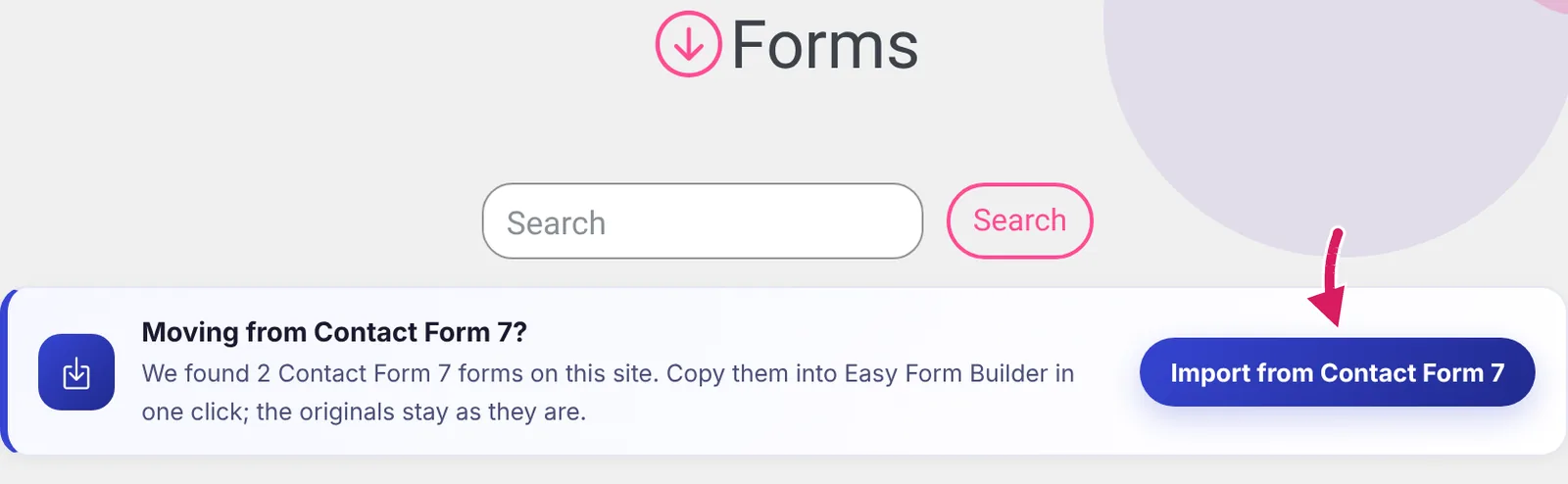
When the site has Contact Form 7 forms, the Create screen and the Panel show a card titled Moving from Contact Form 7? with the button Import from Contact Form 7. The importer works on every plan and loads only on these two screens.
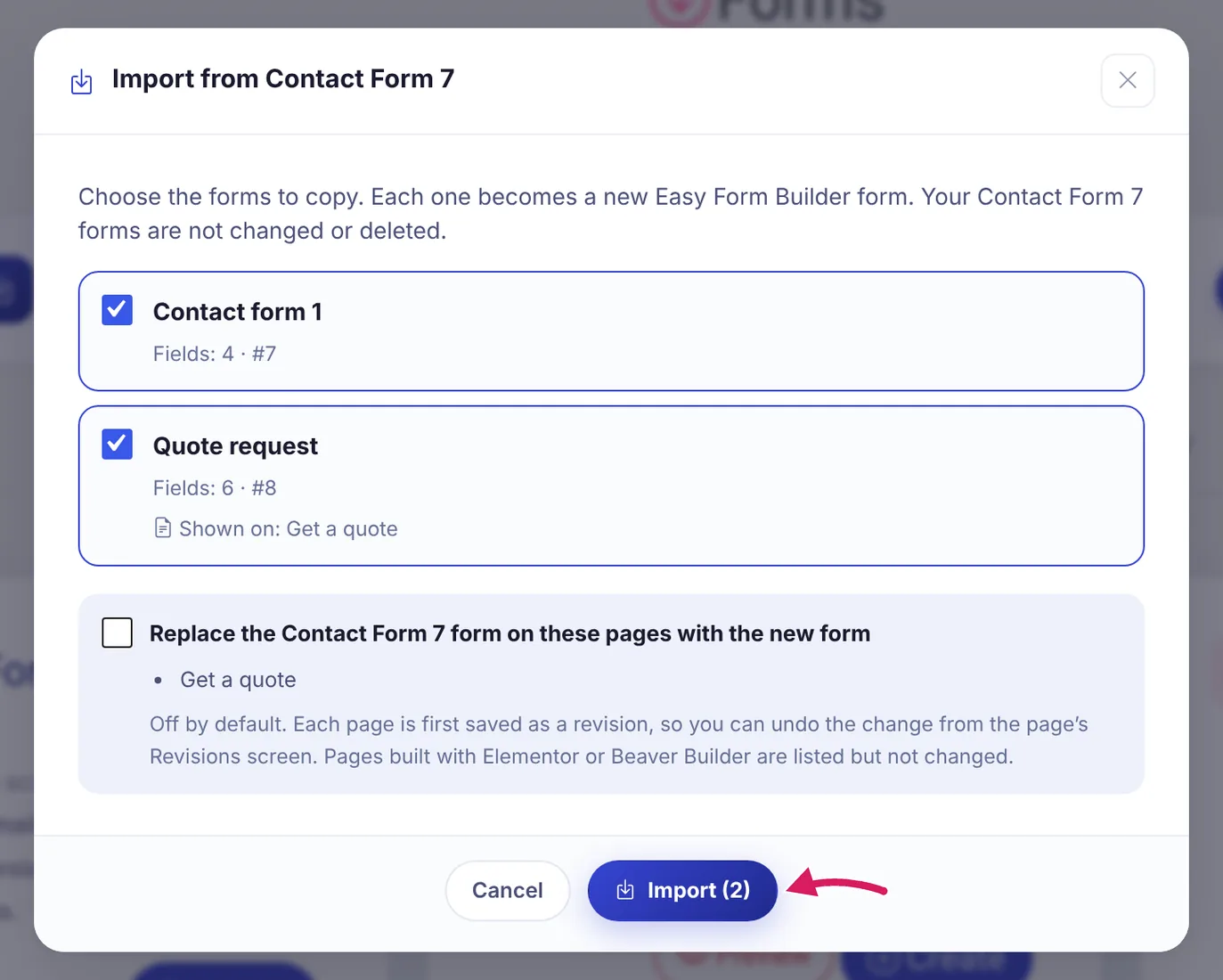
The dialog lists your Contact Form 7 forms with their field count and the pages that show them. Each form you tick becomes a new Easy Form Builder form; the Contact Form 7 forms are not changed or deleted. The option Replace the Contact Form 7 form on these pages with the new form is off by default. If you turn it on, each page is saved as a revision first, so the change can be undone.
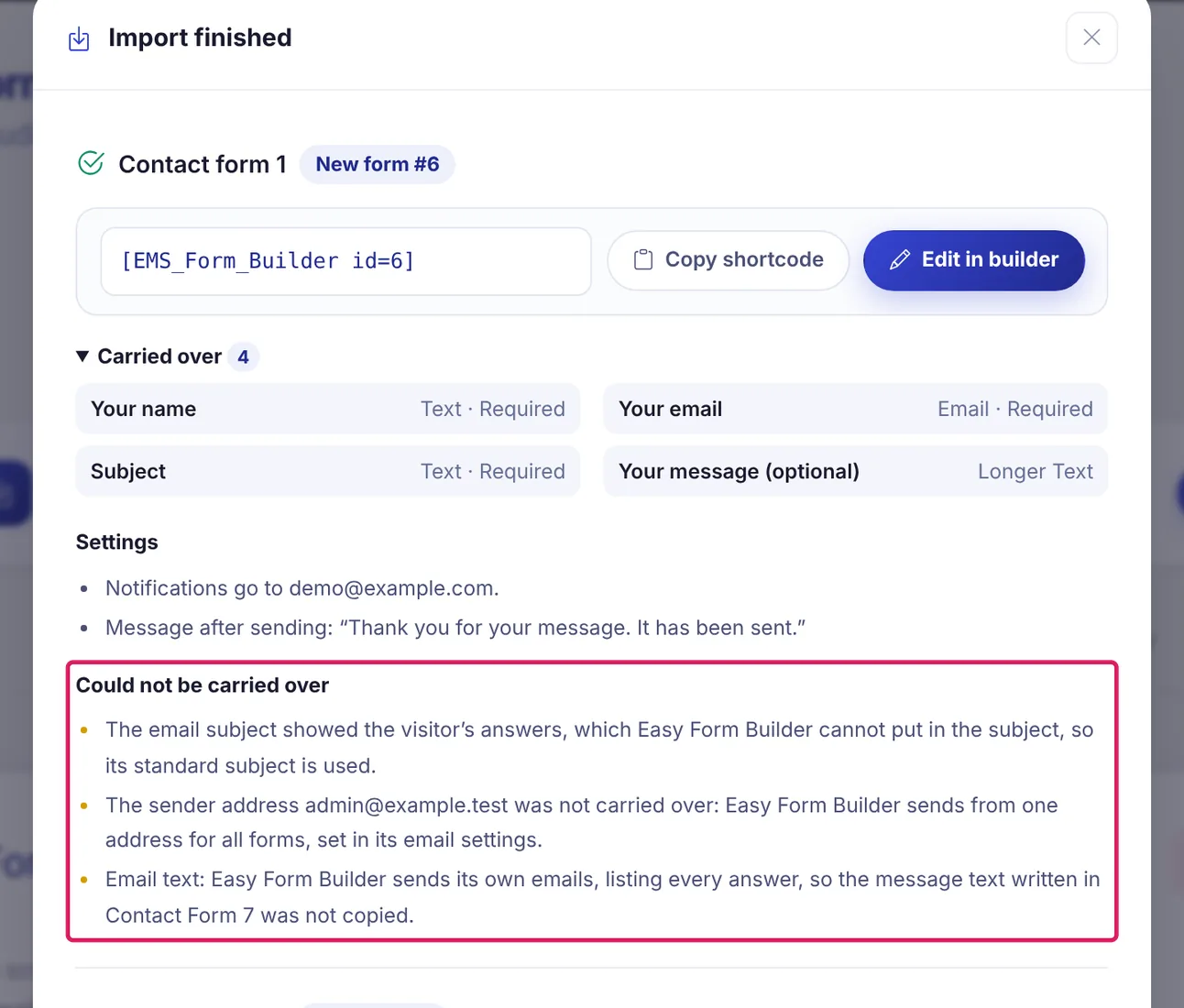
After Import, the Import finished report shows the shortcode of each new form, for example [EMS_Form_Builder id=6], the fields under Carried over, the notification address and the message after sending. Could not be carried over names what was left behind and why. In our test, six Contact Form 7 fields arrived as Text, Email, Select, Radio Button, Longer Text and Terms fields.
More in Free and Free Plus
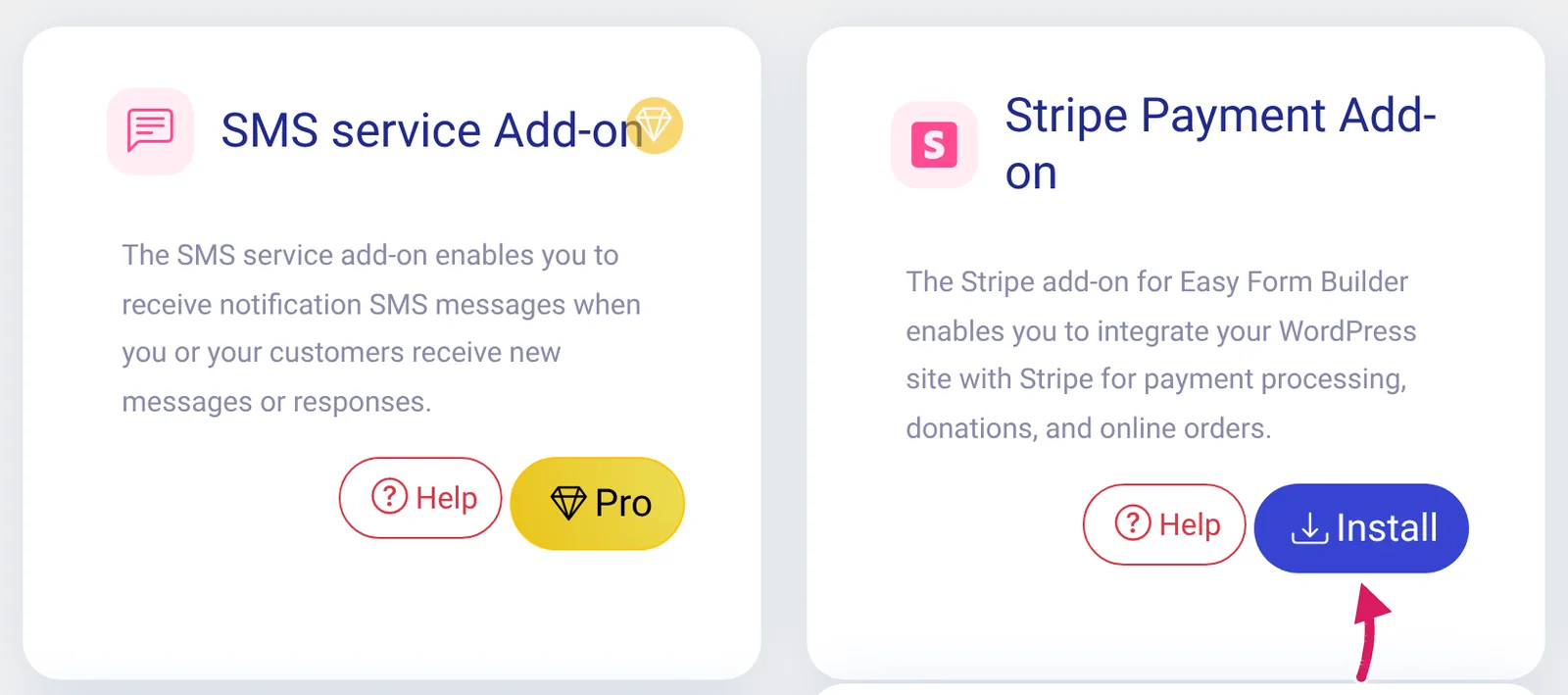
- Stripe and PayPal payments are included in Free Plus. On a Free Plus site the Add-ons page offers Install for the Stripe and PayPal add-ons, while add-ons that still need a license show Pro. The Stripe payment form guide walks through the setup.
- The Free plan has 20 form fields. Terms and conditions, country list, star rating and heading joined the earlier 16.
- CSV export of form entries is free on every plan.
Safer payments, emails and cached pages
- Stripe one-time payments are verified with Stripe on the server before the form is submitted. Pending payments are re-checked in the background, and an attempt that was declined or abandoned is marked Failed after an hour.
- Form emails are on by default. The owner’s notification email now includes the submitted answers and has Reply-To set to the visitor’s address.
- Pages that show a form are kept out of page caches (LiteSpeed, WP Rocket, W3 Total Cache, WP Super Cache, Cloudflare and others), and form scripts are excluded from script optimizers. Developers can adjust this with the
emsfb_cache_bypassfilter. - Security fixes: a stored cross-site scripting issue through the Signature field was fixed, the reCAPTCHA on the confirmation-code page is now verified on the server, and uploaded archives must really be the type they are named as.
- Smaller changes: forms use your theme’s font, a dashboard notice reports form requests that fail on the server, and network activation on WordPress Multisite no longer causes a fatal error.
What changed in Easy Form Builder 4.3
Version 4.3.0 has no new screens. It improved form builder security and set up the translation and localization infrastructure that the admin screens use today. The details are in the 4.3.0 announcement about language support.
What’s new in Easy Form Builder 4.2
Version 4.2.0 is about knowing whether your form emails arrive. It added an onboarding wizard for new installations, a weekly email report and an Email Error Log.
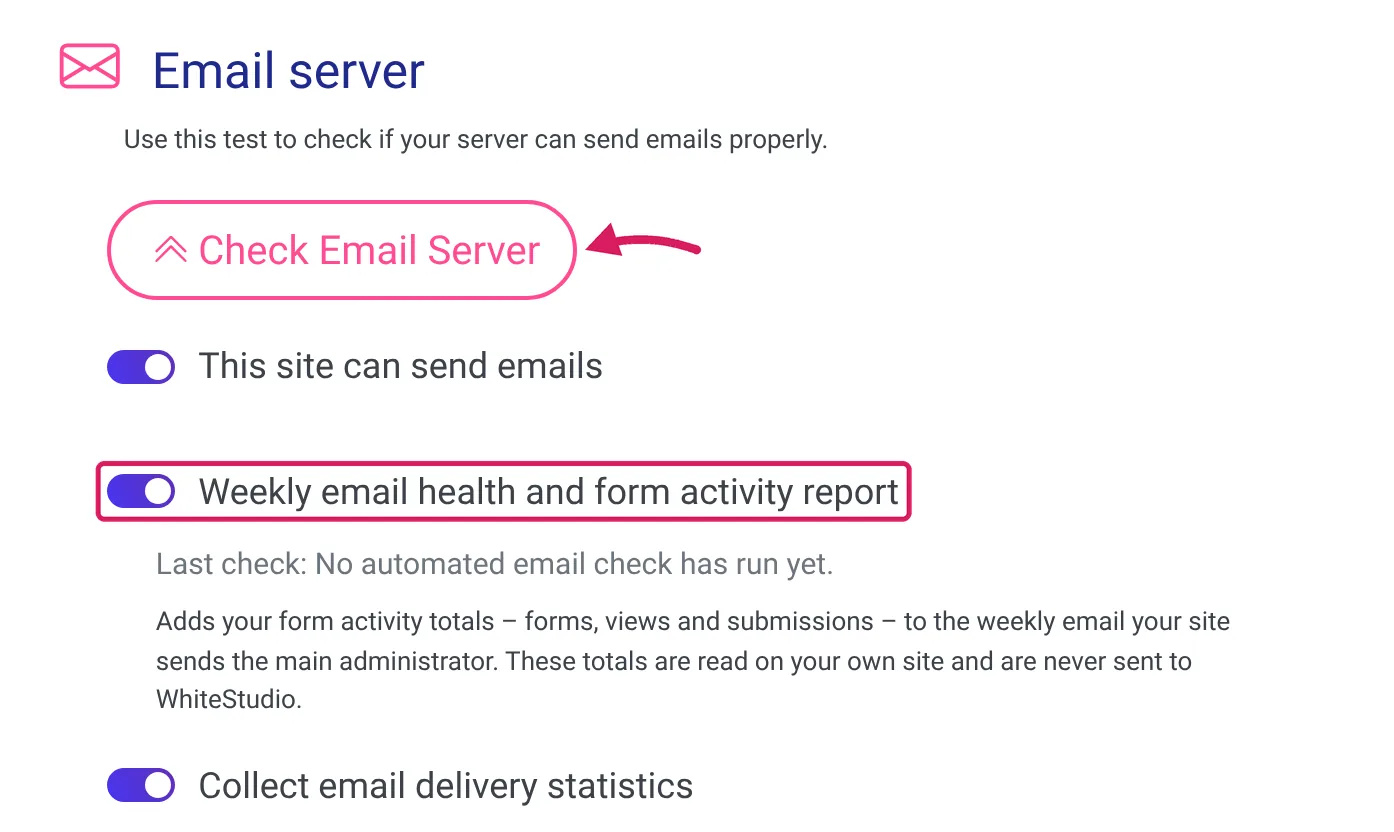
Under Panel » Settings » Email Settings you find the Check Email Server button and two switches: Weekly email health and form activity report and Collect email delivery statistics. The weekly report runs on every plan. Free Plus and Pro sites can switch the form activity part off; the settings screen says that only Pro users can turn the delivery statistics off.
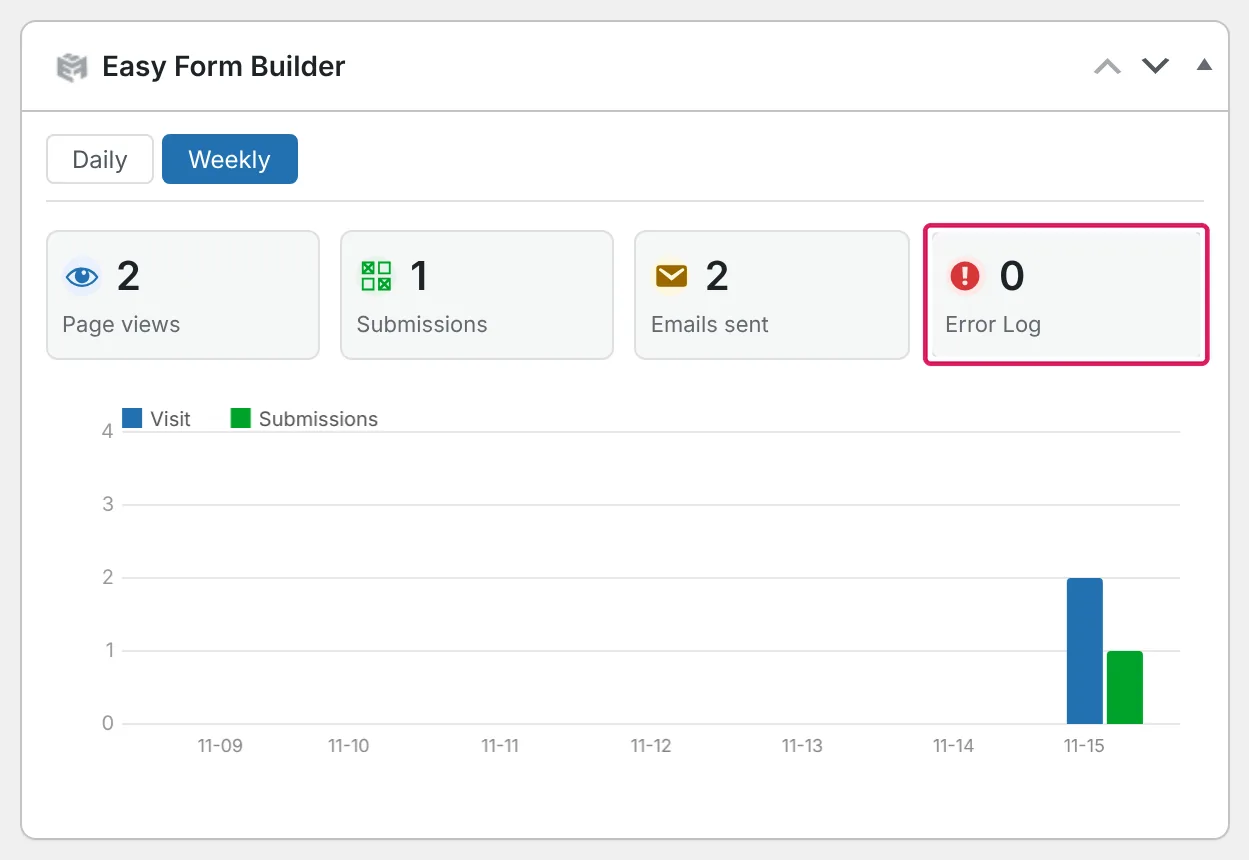
The Easy Form Builder widget on the WordPress Dashboard shows Page views, Submissions, Emails sent and an Error Log tile for a day or a week. A click on the tile opens the Email Error Log.
4.2.0 also hardened upload, login, registration and tracking-code handling and updated the database schema. Existing installations run the schema upgrade automatically when the plugin loads.
What’s new in Easy Form Builder 4.1
Versions 4.1.0 to 4.1.3 added the features most people notice first: conditional logic, the email delivery check, recorder fields and builder autosave.
Conditional logic without code
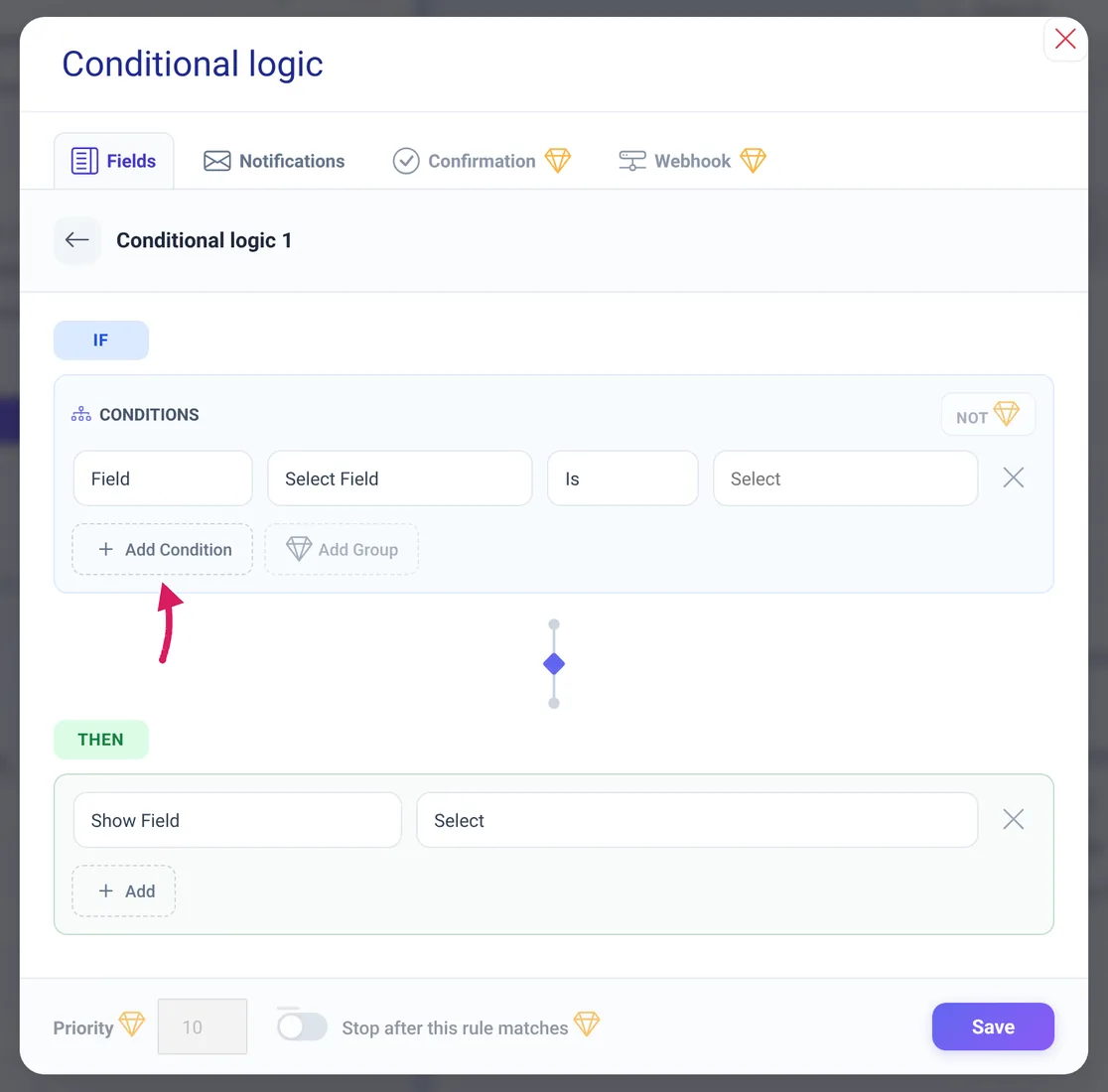
Install the Conditional logic Add-on from the Add-ons page, open a form in the builder, click Form Settings and then Conditional logic. A rule has an IF part with conditions and a THEN part with actions such as Show Field, Hide Field, Required or Jump to Step. Free Plus allows up to 3 rules per form, 2 conditions per rule and 2 notification rules. Pro removes these limits and unlocks the parts marked with a gem: the Confirmation and Webhook tabs, Add Group and calculations. The conditional logic guide covers every rule type.
Email check, recorder fields, uploads and autosave
- Email delivery check (4.1.0): Check Email Server sends a real test message, waits until it arrives and shows a score out of 100. A full report follows by email. It is free on every plan.
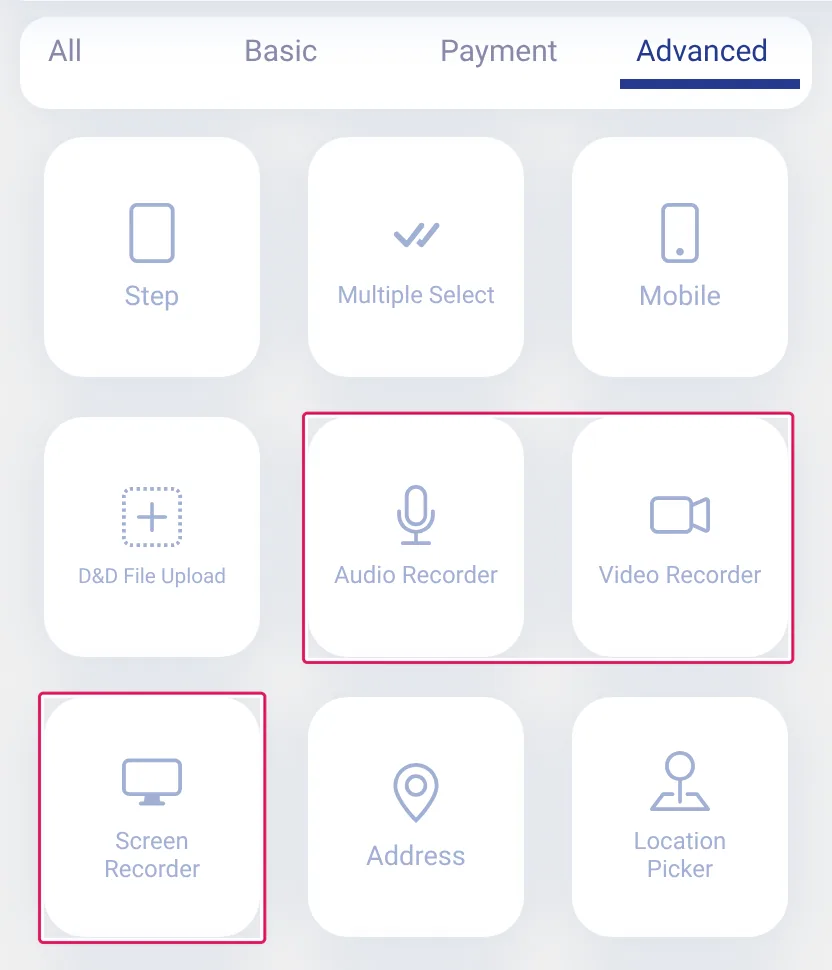
- Audio, video and screen recording fields (4.1.2): the Advanced group of the field list has Audio Recorder, Video Recorder and Screen Recorder. They are available in Free Plus and Pro.
- File uploads (4.1.0, 4.1.3): visitors can upload multiple files with progress feedback; file upload fields have a built-in limit of 3 files per field, and file types are enforced on the server.
- Builder autosave (4.1.0): the builder keeps an auto-saved draft in your browser and offers to restore it.
- Cached pages (4.1.0, 4.1.3): forms keep working on cached pages instead of showing a security error.
Which plan does each new feature need?
Free and Free Plus cost nothing; Free Plus shows a small “Powered by Easy Form Builder” credit on the form. Pro is the paid license.
| Version | Feature | Plan | Where in the UI |
|---|---|---|---|
| 4.3.1 | Import from Contact Form 7 | Free, Free Plus, Pro | Create and Panel, card Moving from Contact Form 7? |
| 4.3.1 | 20 form fields in the Free plan | Free | Field list of the builder |
| 4.3.1 | CSV export of form entries | Free, Free Plus, Pro | Entries list of a form in the Panel |
| 4.3.1 | Stripe and PayPal payments | Free Plus, Pro (add-ons) | Add-ons, then Settings » Payments |
| 4.3.1 | Server-side check of Stripe one-time payments | Free Plus, Pro (with the Stripe add-on) | Automatic |
| 4.3.1 | Form pages kept out of page caches | Free, Free Plus, Pro | Automatic |
| 4.3.1 | Form emails on by default, answers in the owner’s email | Free, Free Plus, Pro | Settings » Email Settings, switch This site can send emails |
| 4.3.0 | Security improvements, translation infrastructure | Free, Free Plus, Pro | Automatic |
| 4.2.0 | Onboarding wizard | Free, Free Plus, Pro | New installations |
| 4.2.0 | Weekly email report | Free, Free Plus, Pro; switching parts off needs Free Plus or Pro | Settings » Email Settings |
| 4.2.0 | Email Error Log and dashboard widget | Free, Free Plus, Pro | WordPress Dashboard, widget Easy Form Builder |
| 4.1.0 | Conditional logic | Free Plus (3 rules per form), Pro (no limits) | Add-ons, then Form Settings » Conditional logic |
| 4.1.0 | Email delivery check | Free, Free Plus, Pro | Settings » Email Settings, button Check Email Server |
| 4.1.0 | Builder autosave | Free, Free Plus, Pro | Builder, automatic |
| 4.1.2 | Audio, video and screen recorder fields | Free Plus, Pro | Field list of the builder, group Advanced |
| 4.1.3 | Limit of 3 files per upload field, file types enforced on the server | Free, Free Plus, Pro (the File Upload field) | Field list of the builder |
How to update Easy Form Builder to 4.3.1
- Back up your site, or at least the database.
- In the WordPress admin, open Dashboard » Updates or Plugins » Installed Plugins and run the update offered for Easy Form Builder. WordPress describes both ways in its Manage Plugins documentation.
- Check the row of Easy Form Builder on the Plugins screen: it must read Version 4.3.1.
- Open Easy Form Builder » Panel once and submit a test entry on one of your forms.

The update needs no manual migration: the database schema upgrade runs automatically when the plugin loads. On a new site, install the plugin from its page on WordPress.org.
Note: Updating from an older version turns This site can send emails on once if it was off. If you had turned it off on purpose, turn it off again under Panel » Settings » Email Settings; it then stays off.
Troubleshooting after the update
| Symptom | Likely cause | Fix |
|---|---|---|
| The site suddenly sends form emails | 4.3.1 turns form emails on once during the update | Switch This site can send emails off under Settings » Email Settings and click Save |
Stripe payments fail and Stripe answers 401 | Before 4.3.1, saving the settings could replace the secret key with a placeholder | Paste the Secret Key again under Settings » Payments and click Save |
| Lookups on the confirmation-code page are refused | The reCAPTCHA of that page is now verified on the server | Save the reCAPTCHA secret key as well, or switch the reCAPTCHA of the response box off |
| Visitors still see an old form or a security error | A page cache or CDN serves a copy stored before the update | Purge the page cache and CDN once; see how to exclude forms from caching plugins |
| A dashboard notice reports form requests that fail | A firewall, a REST API restriction or a rate limit blocks a form request | Open an Easy Form Builder screen to read the details, then allow the request in the security plugin or firewall |
| A notice asks you to reinstall the plugin | A plugin file is missing after an incomplete update | Install Easy Form Builder again from Plugins » Add Plugin; the plugin stays inactive for that request instead of breaking the site |
| The update is not offered | The site runs WordPress older than 5.7 or PHP older than 7.4 | Update WordPress and PHP first |
Frequently asked questions
Is Easy Form Builder 4.3.1 free?
Yes. The update is free, and the Free and Free Plus plans cost nothing. Free has 20 form fields, multi-step forms, email notifications and CSV export. Free Plus adds the advanced fields, conditional logic with limits, and Stripe and PayPal payments.
Do I need Pro for Stripe or PayPal payments?
No. Since 4.3.1 the Stripe and PayPal add-ons can be installed on the Free Plus plan. Earlier versions needed Pro.
Can I move my Contact Form 7 forms to Easy Form Builder?
Yes. With Contact Form 7 forms on the site, click Import from Contact Form 7 on the Create or Panel screen. Fields, choices, required fields, notification addresses and the message after sending are copied; a report lists anything that could not be carried over.
Is conditional logic free in Easy Form Builder?
It is free in Free Plus with up to 3 rules per form, 2 conditions per rule and 2 conditional email notification rules. Pro removes the limits and adds nested groups, calculations, conditional confirmations and webhooks.
Which WordPress and PHP versions does 4.3.1 need?
WordPress 5.7 or later and PHP 7.4 or later. The plugin’s readme lists it as tested up to WordPress 7.1.
Where is the full Easy Form Builder changelog?
On the Development tab of the plugin page on WordPress.org. It lists every fix of 4.3.1, including the ones this recap leaves out.
What’s next
That’s the 4.x line so far: update to 4.3.1, then try the feature that fits your site.
- Free, Free Plus and Pro: what each plan includes
- Fix form emails that do not arrive
- Build advanced file upload forms
Written for Easy Form Builder 4.3.1 on . Sources: the plugin’s changelog and code, and a test site on the Free Plus plan.
