Short answer: Easy Form Builder is a free Contact Form 7 alternative with a drag-and-drop builder. It saves every submission in your WordPress dashboard, gives each one a confirmation code and exports entries to CSV. It runs on PHP 7.4, while Contact Form 7 6.2.6 needs PHP 8.3, and it imports your Contact Form 7 forms.
Quick facts
- Plan: Free for everything compared here; conditional logic and payments need Free Plus, which is also free
- Time: about 5 minutes to read; about 2 minutes to import your forms
- Tested with: Easy Form Builder 4.3.1 on WordPress 7.1.4
- Contact Form 7 facts come from its WordPress.org pages, checked on (version 6.2.6)
- Last verified:
Easy Form Builder vs Contact Form 7 at a glance
Every Contact Form 7 value below is taken from its WordPress.org plugin page and the Flamingo plugin page, both published by Rock Lobster Inc. Easy Form Builder values come from its own WordPress.org page and a test on WordPress 7.1.4.
| Easy Form Builder 4.3.1 | Contact Form 7 6.2.6 | |
|---|---|---|
| Cost | Free and Free Plus cost nothing; Pro is a paid plan | Free and open source |
| Minimum PHP version | 7.4 | 8.3 |
| Minimum WordPress version | 5.7 | 7.1 |
| Tested up to | WordPress 7.1.5 | WordPress 7.2 |
| Active installations | 1,000+ | 10+ million |
| How you build a form | Drag-and-drop builder | Form text with tags in square brackets (shown in its WordPress.org screenshot) |
| Saved submissions | Stored in your WordPress database | Not stored; the separate Flamingo plugin stores them |
Contact Form 7 is far more widely installed and is actively maintained: version 6.2.6 was released on November 23, 2026. The differences that matter in practice are the PHP requirement, how forms are built and whether submissions are kept.
PHP and WordPress requirements
Contact Form 7 6.2.6 lists PHP version 8.3 or higher and WordPress version 7.1 or higher. On a site with an older PHP version, WordPress shows “There is a new version of Contact Form 7 available, but it does not work with your version of PHP” instead of an update link, so the site stays on the older release until the host upgrades PHP.
Easy Form Builder 4.3.1 needs PHP 7.4 and WordPress 5.7. Check your own version under Tools » Site Health » Info » Server. Upgrading PHP is still the better long-term fix for security; a form plugin only takes away the pressure to do it today.
Building forms: drag and drop or tags
The screenshot on Contact Form 7’s WordPress.org page shows its editor: the form is written as text with HTML and tags such as [text* your-name], with buttons that insert each tag, and separate Form, Mail, Messages and Additional Settings tabs.
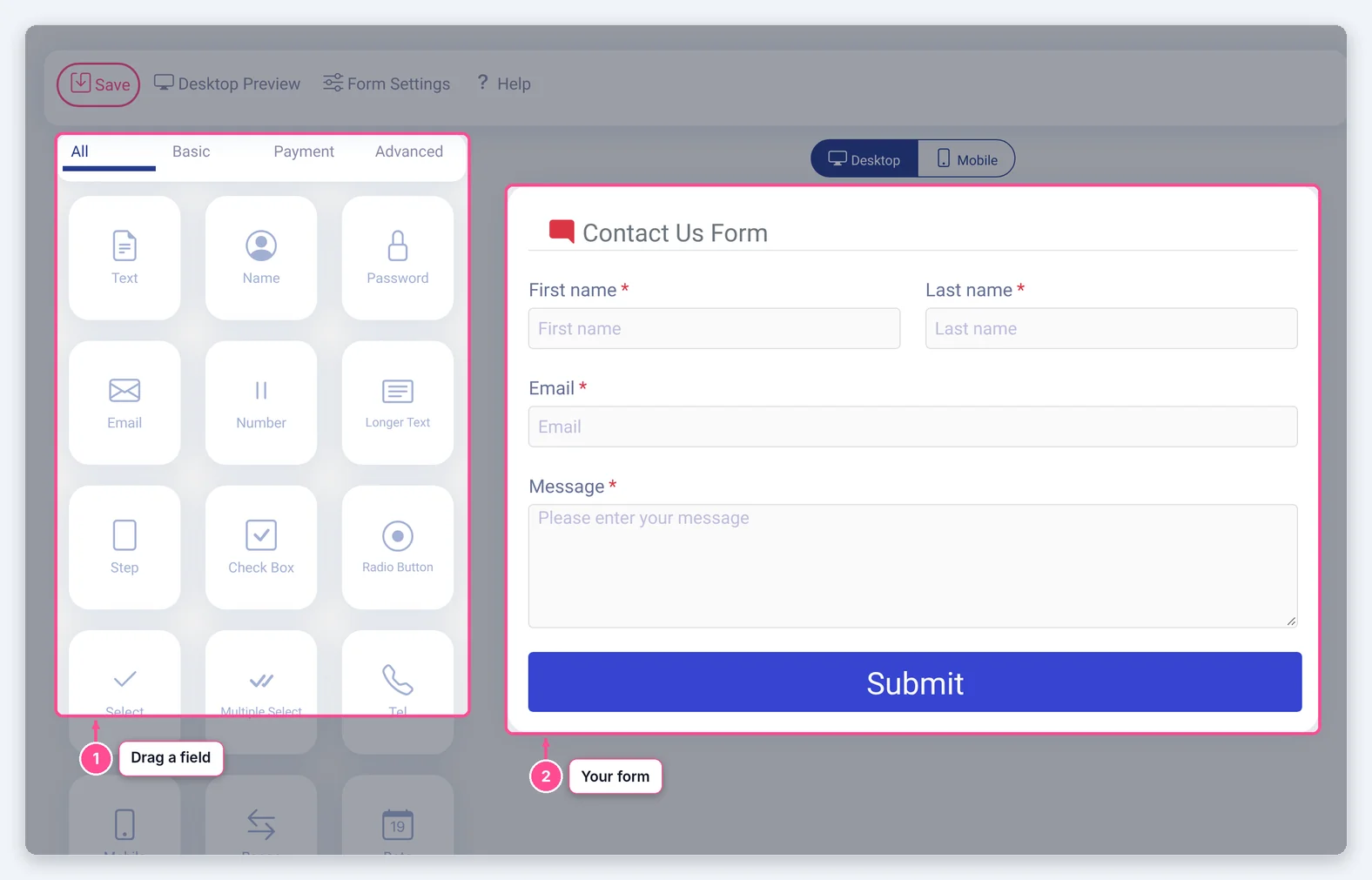
In Easy Form Builder you drag fields from the palette onto the form and edit labels, placeholders and required settings in a side panel. Ready-made templates (contact, multi-step contact, registration and more) give you a starting point. The Free plan has 20 field types; Free Plus adds 28 more, such as signature, location picker, payment fields and Yes/No.
Saved entries, confirmation codes and CSV export
According to the Flamingo page, Contact Form 7 “doesn’t store submitted messages”; Flamingo is the separate plugin that saves and lists them. Without it, you depend on the notification email arriving.
Easy Form Builder saves every submission in your WordPress database on every plan. In our test, a contact form built from the Contact us template showed the visitor a confirmation code right after sending, because Show Confirmation Code is switched on in its Form Settings.

The same entry appeared under Easy Form Builder » Panel when we clicked the form’s message icon, with its content, confirmation code and date. Download CSV file exported it as a spreadsheet with one column per field, plus the entry number and date.
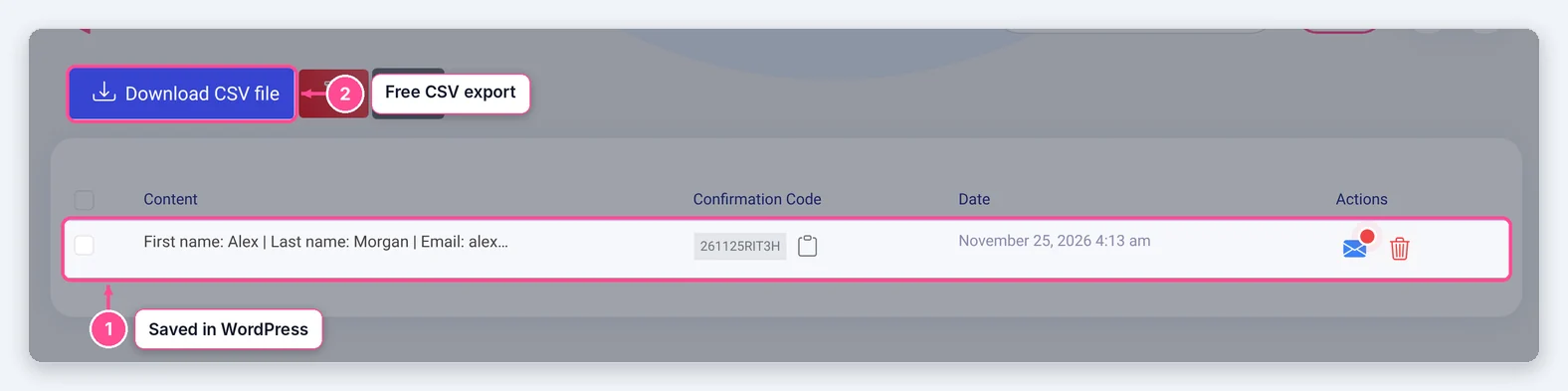
Because every entry is stored, a lost notification email does not mean a lost message. You can also reply to an entry from the dashboard and search it by its confirmation code.
What Easy Form Builder includes for free
These are included at no cost. “Free” means the plugin as installed from WordPress.org; “Free Plus” is the free upgrade that adds a small “Powered by Easy Form Builder” credit on the form page.
| Feature | Plan |
|---|---|
| Drag-and-drop builder with 20 field types and templates | Free |
| Saved entries and replies from the dashboard | Free |
| Confirmation code for every submission and a lookup page | Free |
| Multi-step forms | Free |
| Email notifications with a visual template editor | Free |
| Export entries to CSV | Free |
| Email delivery check with SPF, DKIM and DMARC results | Free |
| Import of Contact Form 7 forms | Free |
| Conditional logic (3 rules per form, 2 conditions per rule) | Free Plus |
| Stripe and PayPal payment forms | Free Plus |
| Signature, location picker, matrix and 25 more advanced fields | Free Plus |
Pro removes the conditional logic limits and adds paid add-ons such as Google Sheets and the Security & Spam Protection add-on. See Free, Free Plus and Pro compared.
When Contact Form 7 is still a good fit
- Your server already runs PHP 8.3 or newer and your forms work.
- You are comfortable editing forms as text with tags.
- You only need the notification email, or you are happy to add Flamingo to keep submissions.
- You rely on Contact Form 7 add-ons that have no equivalent elsewhere.
If none of the reasons to switch apply to you, there is no need to move a form that works.
How to switch from Contact Form 7
- Install and activate Easy Form Builder and keep Contact Form 7 active.
- Open Easy Form Builder » Create and click Import from Contact Form 7.
- Choose the forms, optionally let the importer replace the old form on your pages, and click Import.
- Submit each new form once and check the notification email, then deactivate Contact Form 7 when no page uses it.
Fields, required settings, notification addresses and messages carry over; your Contact Form 7 forms are not changed. The full walkthrough is in how to import Contact Form 7 forms into Easy Form Builder.
Troubleshooting
| Problem | Cause | Fix |
|---|---|---|
| Contact Form 7 shows an update you cannot install | Your PHP version is older than 8.3 | Ask your host to upgrade PHP, or move the forms to a plugin that supports your version |
| Import from Contact Form 7 is missing | Contact Form 7 is not active or has no forms | Activate Contact Form 7 until the import is finished |
| An imported form sends a plainer email | Contact Form 7 mail templates are not copied | Edit the email in the new form’s Form Settings |
| A page still shows the old form | The page was built with Elementor or Beaver Builder, or the form sits in a widget | Replace the shortcode there with the new |
| Old Contact Form 7 messages are not in Easy Form Builder | The importer copies forms, not messages | Keep Flamingo (if you used it) to read the old messages |
Frequently asked questions
Is Contact Form 7 free?
Yes. Its WordPress.org page describes it as free and open source software.
Does Contact Form 7 save form submissions?
Not by itself. The Flamingo plugin page says Contact Form 7 does not store submitted messages and that Flamingo adds that storage.
Is Easy Form Builder free?
Yes. The Free version and the Free Plus version cost nothing; Pro is a paid plan for unlimited conditional logic and premium add-ons.
Which PHP version does Easy Form Builder need?
PHP 7.4 or newer and WordPress 5.7 or newer, according to its WordPress.org page for version 4.3.1.
Can I keep both plugins active while I switch?
Yes. The importer needs Contact Form 7 to be active, and both plugins can run on the same site while you move your forms page by page.
What’s next
- Import Contact Form 7 forms into Easy Form Builder
- Build a responsive contact form in WordPress
- Manage WordPress form submissions
- Turn on the confirmation code
- Create a multi-step form in WordPress
Updated for Easy Form Builder 4.3.1 on , from a test on WordPress 7.1.4. Contact Form 7 details are from its WordPress.org pages for version 6.2.6, checked the same day.