Short answer: Every Sunday at 11:00 (site time), Easy Form Builder sends a real test email and then emails the WordPress administrator a deliverability report. A score of 70 or more with green SPF, DKIM and DMARC checks means your form emails reach the inbox. A lower score means fix sending first, usually with SMTP.
Quick facts
- Plan: Free. The report is part of every plan; switching parts of it off needs Free Plus or Pro.
- Time: about 2 minutes to read a report
- Sent: Sundays at 11:00 in your WordPress timezone, to the administration email address
- Tested with: Easy Form Builder 4.3.1 on WordPress 7.1.4
- Last verified:
What the weekly email deliverability report is
Easy Form Builder checks your form email on a schedule, so you do not need to remember to test it. Once a week the plugin does three things:
- It sends a real test message, from the From Address in your email settings, to the WhiteStudio email testing service. The message goes through the same WordPress mail path your form notifications use.
- It waits until the service reports what arrived (it checks every 30 to 60 seconds and gives up after about 15 minutes).
- It builds the report on your own site and emails it to the main WordPress administrator. The subject is “Weekly Easy Form Builder report for your site name“.
The report is a regular email from your site. It goes to the address under Settings » General » Administration Email Address in WordPress, not to the Alert Email in Easy Form Builder. It uses the same email template as your other Easy Form Builder emails.
The weekly check sends the service your site address, the sender and administrator email addresses, the plugin, WordPress and PHP versions, the site language and your plan. Form submissions and the “This week” totals are never sent; those numbers are read on your own site.
Where to find the report settings
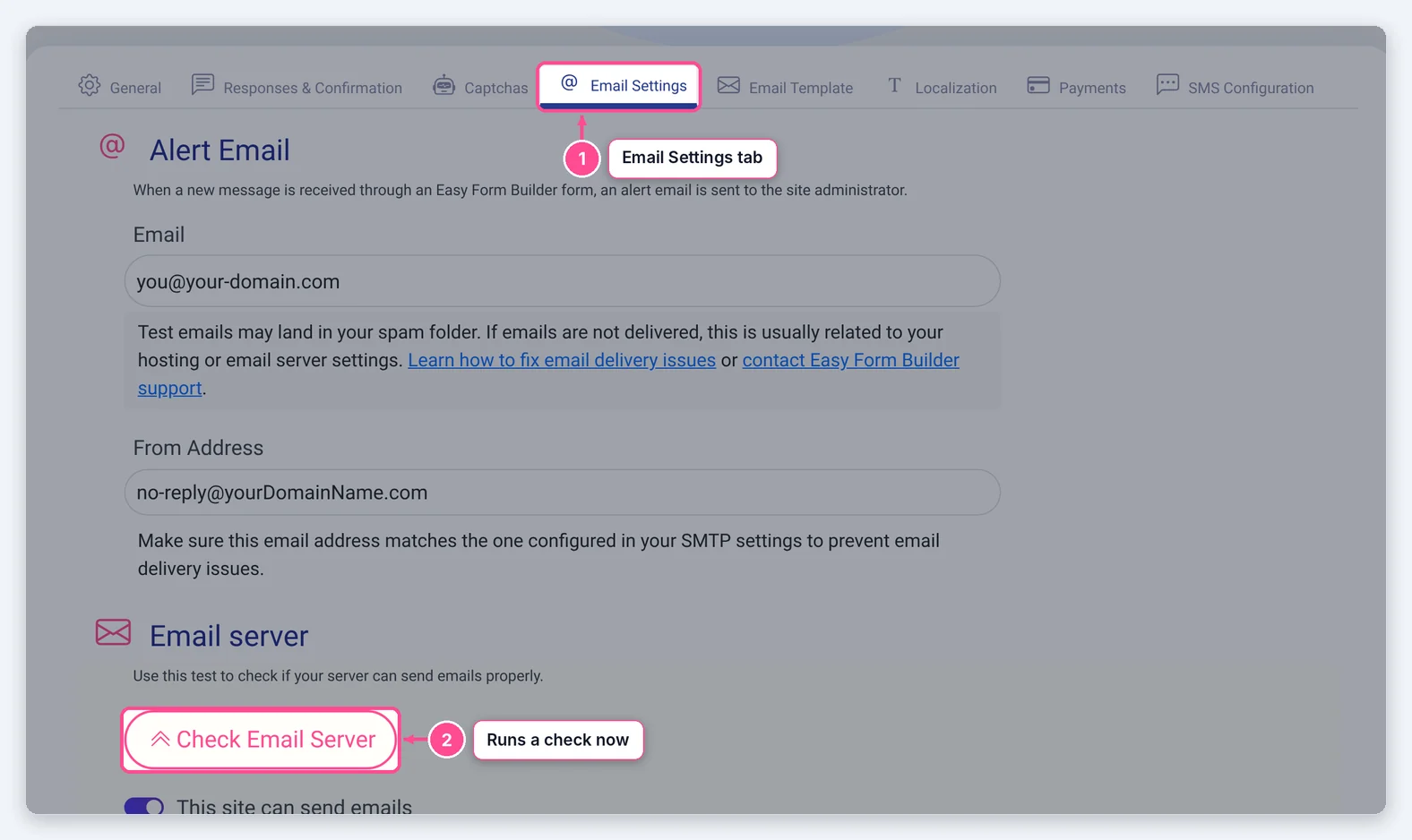
- In WordPress, open Easy Form Builder » Panel, click Settings and open the (1) Email Settings tab.
- Under Email server, (2) Check Email Server runs the same delivery test right now, so you do not have to wait for Sunday.
- Below it are the two report switches. (1) Weekly email health and form activity report adds your form activity totals to the email. Under it, Last check shows the result and date of the last weekly run.
- (2) Collect email delivery statistics counts sent and failed emails and adds the delivery section (score, checks and advice) to the email.
- If you change a switch, click (3) Save.
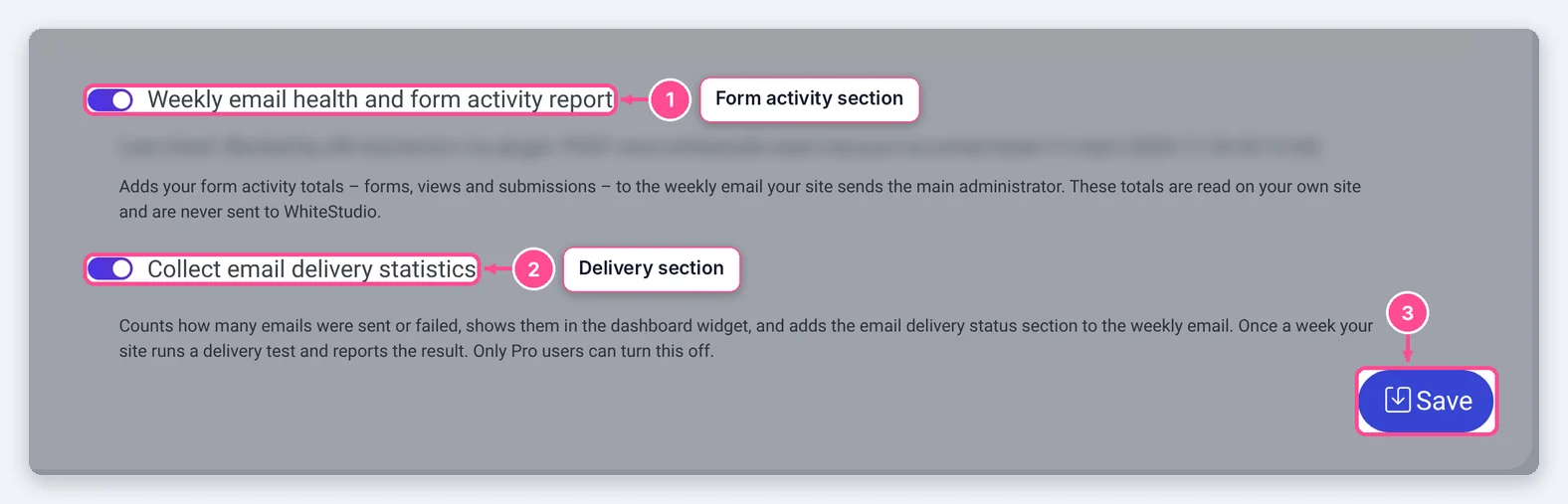
Both switches are on by default. See which plan can turn what off.
How to read the deliverability score
The top of the report holds the result of the test: (1) a circle with the score out of 100, and under it a sentence with the grade the testing service gave. A green circle means healthy; a red circle means there is work to do.
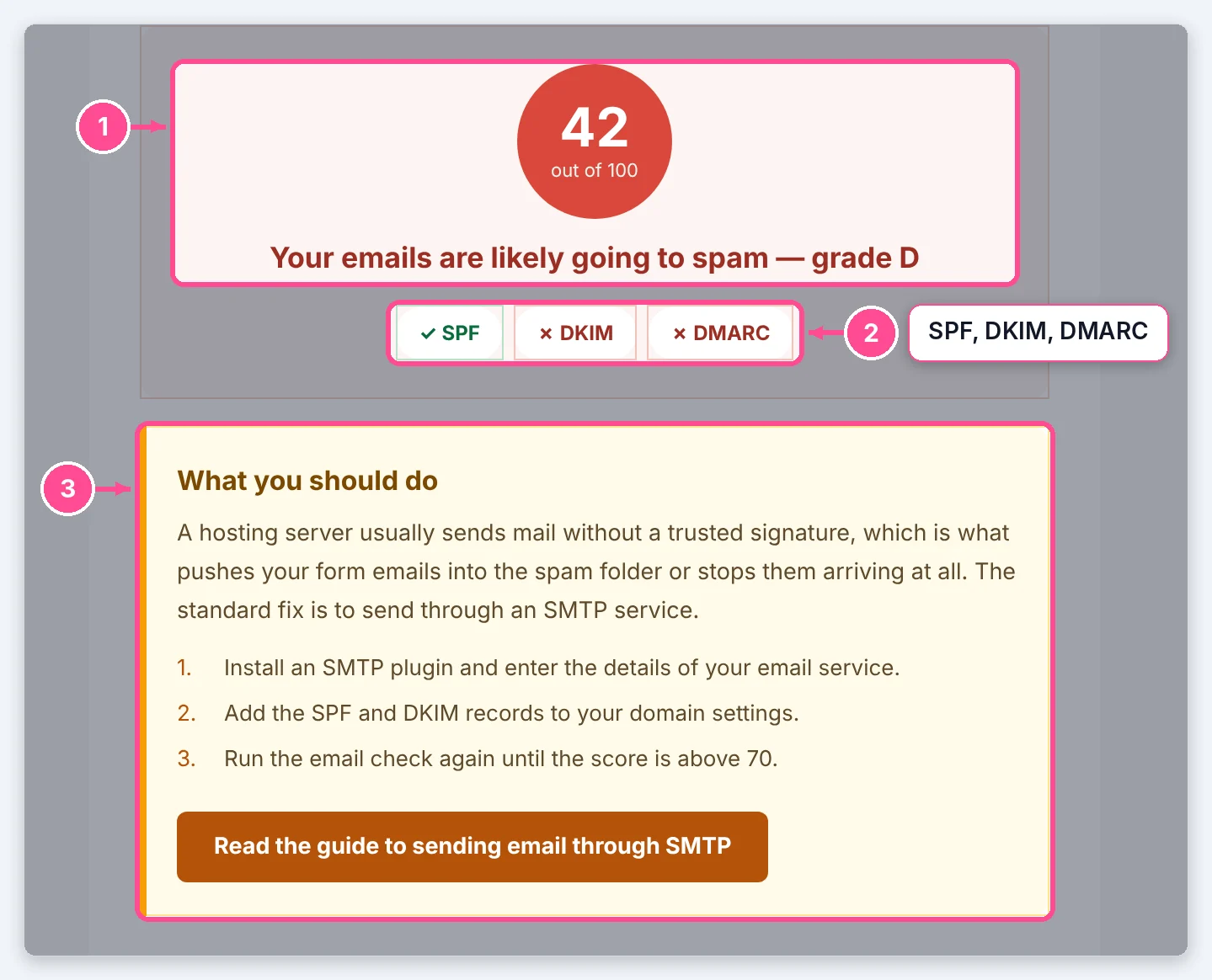
Sample report with test values, rendered by Easy Form Builder 4.3.1.
| What the report says | What it means |
|---|---|
| Your email delivery is healthy | The test email arrived and scored 70 or more. Nothing to do. |
| Your emails are likely going to spam | The email arrived but scored under 70. Mailboxes do not fully trust your sender, so many will file form emails as spam. |
| WordPress sent your email, but it never arrived | WordPress handed the message to the mail server, but it was lost, delayed or rejected after it left your site. |
| WordPress could not send your email | WordPress reported an error while sending, so nothing left the site. |
| Your emails are not reaching anybody | No test email reached the service. |
| We could not confirm your emails are being delivered | There is no score this week. See report without a score. |
Three numbers matter in Easy Form Builder 4.3.1:
- 70 or more (with the email delivered) is healthy. This is also the target in the report’s own advice.
- Under 50: the plugin also shows a red notice at the top of every wp-admin screen, such as “Your form emails are going to the spam folder”, with a Run the email check button.
- Under 20: the run counts as failed even if the email arrived. The report says the score is “below 20, so the emails your forms send are very likely to be rejected or filtered as spam”.
SPF, DKIM and DMARC checks in the report
Under the score, (2) up to three small labels show whether the test email passed each authentication check. A green tick means passed; a red cross means the check failed or the record is missing. A check is shown only when the testing service returned a result for it.
| Check | What it proves | If it has a red cross |
|---|---|---|
| SPF | Your domain lists the server that sent the email as allowed to send for it. | Set up an SPF record |
| DKIM | The email carries a digital signature that matches your domain. | Set up DKIM |
| DMARC | Your domain publishes a policy that tells mailboxes what to do with unauthenticated mail. | Set up DMARC |
A red DKIM label is common on shared hosting, because the host’s mail server does not sign mail for your domain. Sending through an email service fixes DKIM and usually SPF in one step. The guide to fixing WordPress not sending email covers all three records end to end.
What to do next: the What you should do box
When the score is under 70, or the email did not arrive, the report adds (3) a yellow What you should do box with three steps:
- Install an SMTP plugin and enter the details of your email service. Follow Set up Easy WP SMTP for your form emails; if you have no email service yet, pick one from the free email sending services.
- Add the SPF and DKIM records to your domain settings (links in the table above).
- Run the email check again until the score is above 70. Use Check Email Server; you do not have to wait for the next weekly report.
The button Read the guide to sending email through SMTP in the box opens the same SMTP guide. When the service sent recommendations, a Detailed analysis list with up to five of them follows the box. If you want to understand why hosting mail lands in spam before you change anything, read why form emails go to spam.
The This week numbers
A healthy report has no advice box. It shows (1) the green verdict and goes straight to (2) the This week tiles:
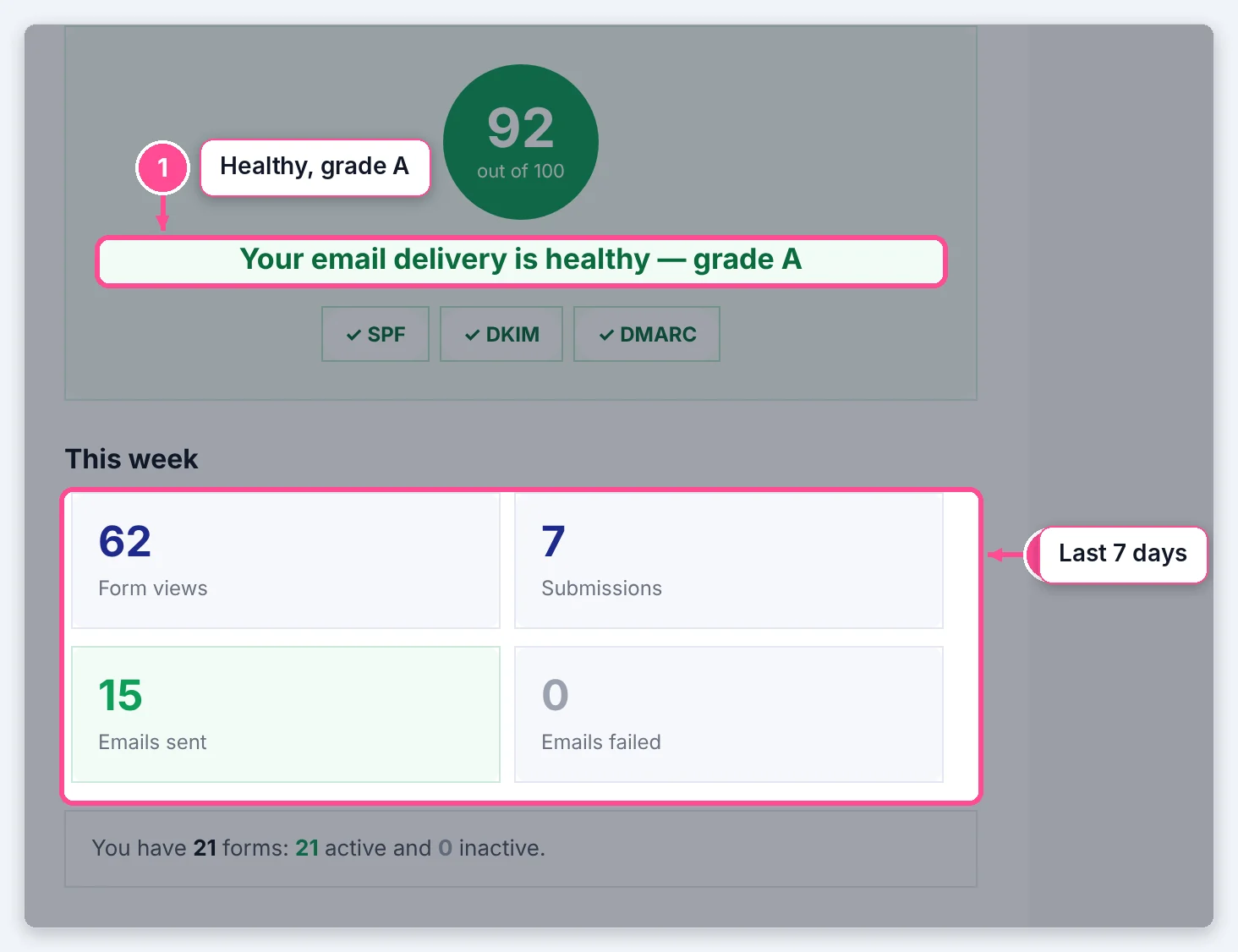
Sample report with test values; the This week numbers come from our test site.
- Form views and Submissions: visits to pages with an Easy Form Builder form, and completed submissions. These appear while the form activity switch is on.
- Emails sent and Emails failed: emails Easy Form Builder handed to WordPress successfully, and those WordPress reported as failed. “Sent” means handed over, not delivered; the score above tells you about delivery.
- A line such as “You have 21 forms: 21 active and 0 inactive.”
The tiles cover the 7 days before the report was generated. The Weekly view of the Easy Form Builder dashboard widget starts at midnight six days ago, so the two can differ. On our test site the report showed 62 form views and the widget 9, because many visits were on the morning that falls inside the report’s window only.
Report without a score
If the test could not be scored, for example because your site could not reach the testing service or the free check limit was used up, the report still arrives. (1) The circle shows a question mark and the headline says “We could not confirm your emails are being delivered”. (2) The button opens the SMTP guide.
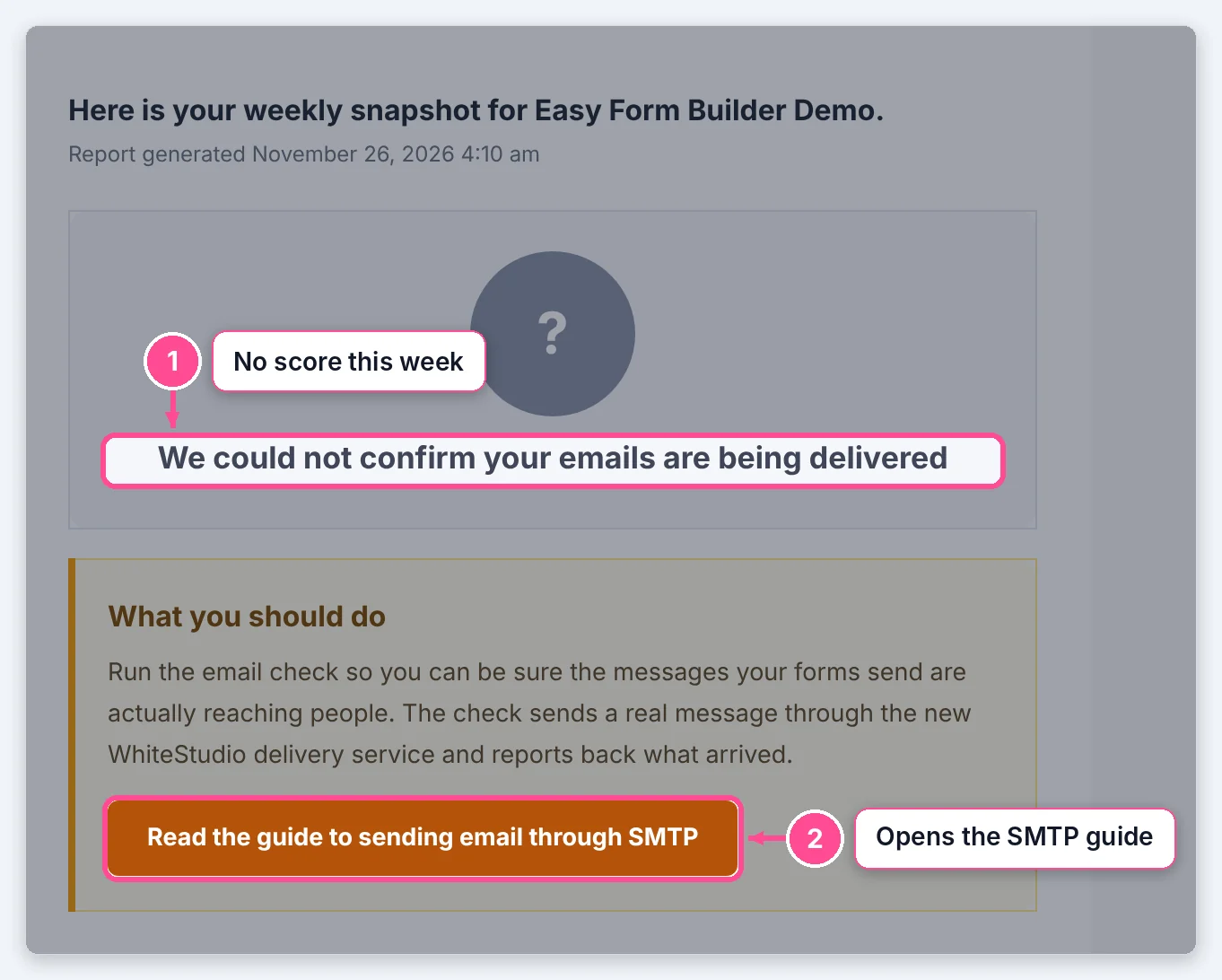
This is not a verdict on your email: nothing was measured. Run Check Email Server yourself. If it also fails to start, ask your host whether your site can make outgoing HTTPS requests. The Last check line under the weekly switch shows the reason the run stopped.
Why the weekly report did not arrive
- Look in spam. The report goes through the same mail path as your form emails. If those land in spam, the report can too.
- Check the administration email. The report goes to the address in Settings » General, not to the Alert Email in Easy Form Builder.
- Wait for traffic. The check runs on WP-Cron, which starts with the first visit to your site after Sunday 11:00. On a site with no visitors, or with WP-Cron disabled and no server cron job, the run waits.
- Check the timezone. “11:00” is the timezone set in Settings » General.
- Look at wp-admin. A broken mail setup cannot deliver the email that reports it. That is why Easy Form Builder also shows the red notice in wp-admin when the last check found the email going to spam or not arriving.
- Both switches off. On Pro, turning off both switches stops the weekly run and the email.
Turn parts of the report on or off
Each switch owns one section of the email:
| Switch | Section it controls | Who can turn it off |
|---|---|---|
| Weekly email health and form activity report | Form views, Submissions and the forms line | Free Plus and Pro. On Free, clicking it opens the upgrade prompt. |
| Collect email delivery statistics | Score, SPF/DKIM/DMARC checks, advice, Emails sent and failed | Pro only |
So on Free and Free Plus the weekly email always arrives with at least the delivery section; on Free Plus you can make it delivery-only. Only Pro can stop the email completely by turning both switches off. Free and Free Plus reports also end with a “Get more from Easy Form Builder Pro” box. We tested the switches on Free Plus; the Free and Pro behaviour is taken from the plugin code.
Frequently asked questions
Is the weekly email deliverability report free?
Yes. It runs on every plan, including the free plugin from WordPress.org. Free Plus and Pro can switch the form activity part off; only Pro can switch the delivery part off.
Can I change the day or time of the report?
No. In Easy Form Builder 4.3.1 it is fixed to Sunday at 11:00 in your WordPress timezone. You can run the same test at any time with Check Email Server.
Who receives the report?
The WordPress administration email address. To send it somewhere else, change that address in Settings » General.
Is this the same as the report after Check Email Server?
The test is the same. Check Email Server shows the score in the panel right away, and its full report follows by email. The weekly report adds the This week totals and arrives on its own every Sunday.
My score is 65 but my emails arrive. Should I fix it?
Yes, if you can. Under 70 many mailboxes will put form emails in spam even though they arrive. Fixing the checks with a red cross, usually by sending through an email service, is what lifts the score.
What’s next
- Fix WordPress not sending email: SPF, DKIM and DMARC
- Set up Easy WP SMTP for your form emails
- Why your form emails go to spam
- Set up DKIM so form emails are not marked as spam
- Set up form email notifications
Updated for Easy Form Builder 4.3.1 on , from the plugin code and a weekly run on a test site; the scored sample reports were rendered by the plugin with test values.